Microsoft To Do
Microsoft’s official lightweight to-do tool, solving daily task pain points
 Todoist
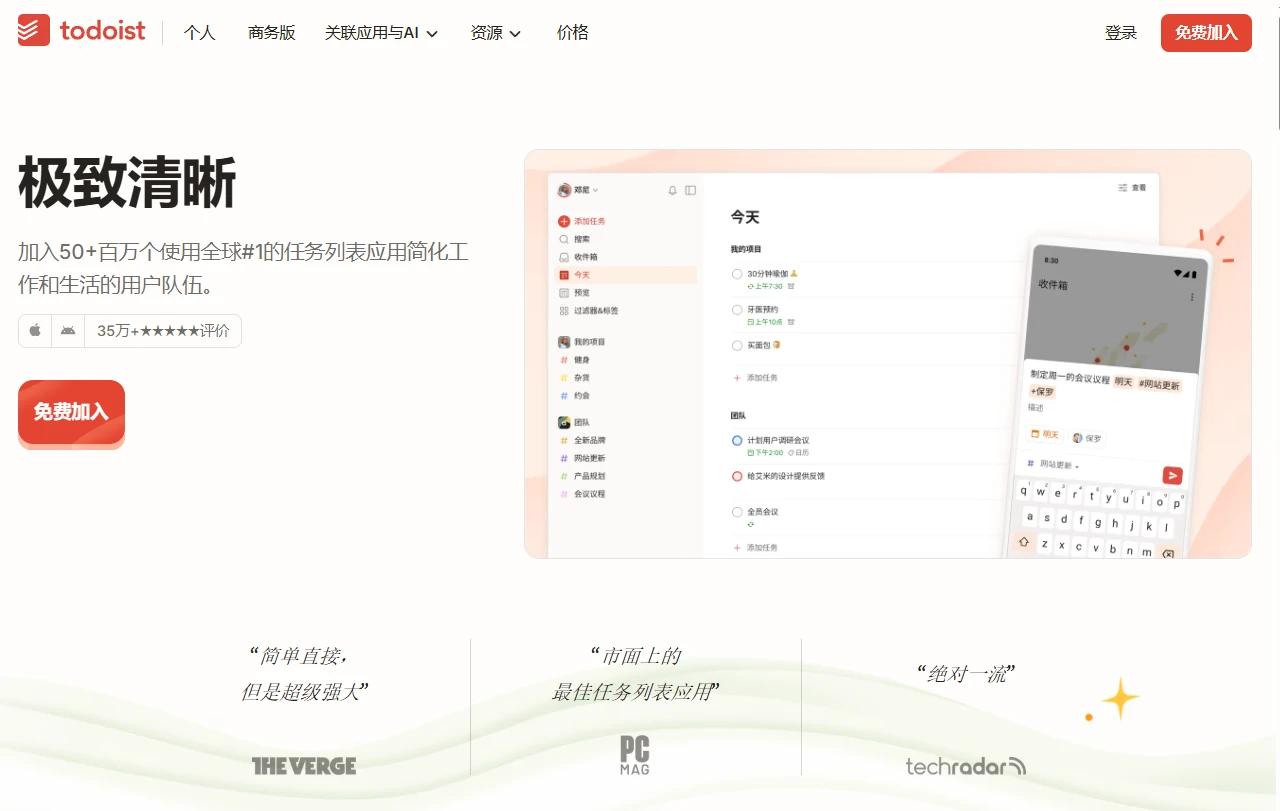
A hands-on experience with the practical to-do tool Todoist
Official website: https://www.todoist.com/zh-CN
My to-do situation used to be a complete mess — deadlines for project reports, my cat’s vaccination, picking up parcels, revising proposals for clients — scattered across several places: categories in my phone’s notes app, fragments of saved messages in WeChat, even sticky notes on my desktop. Every couple of days a task would slip through, and I’d either have to work late to catch up or miss a small perk. Later I tried quite a few tools, and only after using this one steadily for a long time did I work out what really solves my problems — along the way I stepped into plenty of the pitfalls beginners easily fall into.
A mistake many beginners make as soon as they start is treating the tool as a “storage cabinet”, creating seven or eight top-level projects: Work, Personal, Chores, Important… As a result, the tasks within each project are still scattered and impossible to organise. Some people also waste half an hour working out how to set up “complex priority weights” that they barely ever use. What’s more common is setting tasks too broadly, such as “Complete the quarterly project” — staring at that task, you have no idea where to start, and it’s just annoying to look at.
What really won me over was its natural language input — no need to tap any buttons; just say a sentence to your phone and it automatically recognises the task content and time: “Product meeting with Manager Zhang at 3pm tomorrow, tag: client communication”, and a task with priority is generated right in the input box, far faster than other tools that make you pick the date and priority manually. Project sections can be nested — for example, Work can be split into R&D and Operations, and Personal into Pets and Daily Life — so nothing gets muddled. This flexibility perfectly meets my need to handle work and personal matters at the same time.
Many people think the Karma points are just for show — I thought so too at first, but later realised it’s a light form of positive feedback: every small completed task earns a little more, even trivial things like “pick up the parcel”. Watching the points creep up slowly doesn’t put pressure on you like the achievement systems in other tools do. There are also statistics reports — not screens crammed with charts, but a straightforward view of how your recent tasks break down by category. I noticed that my weekly personal chores (paying utility bills, buying cat food, for example) accounted for 30%, so I now schedule them together at the weekend instead of letting them nibble away at my weekdays.
I’d also tried other to-do tools before: some had cluttered interfaces full of useless plug-ins, some popped up ads every few days, and some frequently misread natural language — I’d type “pay rent next Friday” and it would insist I change the date manually. This tool is different: the interface is really clean, there are no ads, the natural language recognition is accurate so you don’t have to keep correcting it, and the free version is entirely sufficient for an ordinary office worker like me — I have no need for unlimited sync or location reminders, the free version’s sync is stable enough that it never drops on the devices I use regularly, so there’s no rush to upgrade to Pro.
Once I got into the swing of it, I summed up a few useful tips, all learned the hard way:
As for Karma, don’t worry about how much it grows — it’s just a bit of fun. What matters is the satisfying feeling of getting tasks done, not hoarding points to compete with others. I once tried saving up Karma to exchange for some perks, only to find it was pointless, so I now treat it as if it doesn’t exist and use it purely to track my own completion rhythm.
This tool suits people who need order but don’t want to spend too much time fiddling with settings — ordinary working professionals and students, for instance; using the core features is enough. If you love flashy features, or need very complex task management and weight settings, you may find it too simple and it won’t meet your needs. A friend of mine who works in project management finds it insufficient and has to switch to a more feature-rich tool, but for an ordinary person like me who handles a dozen or so scattered tasks every day, it’s just right.
One more thing worth mentioning: don’t be tempted by the Pro features. I’ve used the free version for a long time and have never upgraded — if the free version does the job, there’s no need to spend the money. Unless you genuinely need unlimited cross-device sync or location reminders (such as being reminded to “clock in” when you arrive at the office), the free version fully covers everyday needs. Many beginners jump straight to Pro, but in fact most of the advanced features go unused, so the money is wasted.
Now, I enter the day’s tasks every morning without spending time on setup, and I just glance at it when the time comes — everything stays tidy. I hardly ever miss tasks anymore, and even last-minute ones can be quickly entered without hunting around for somewhere to put them. It does have minor drawbacks, though — for example, it doesn’t offer the third-party account logins commonly used in China; you have to use email or Google, which is a bit of a hassle for some users. But given how practical the tool itself is, this small inconvenience is acceptable.