AD Recommendation
Join Now
Important: Please do not trust the content and ads of various websites easily! Recommended reading: Safety Tips
HQ ICON
Scan to visit on your phone
4wks agoupdate 916 00
0

HQ ICONHQ ICON

Parse and download high-quality icon assets for iOS and macOS apps


Screenshots

HQ ICON

Why Do You Need HQ ICON? Instead of Other Icon Extraction Tools

If you’ve ever struggled to find high-quality icons for iOS or macOS apps — for example, when App Store screenshots look blurry for product promotion graphics, or finding the original IPA package is a hassle, this article will help you choose the right tool and avoid pitfalls.

There are many icon extraction tools available online, but most have their own issues: some only support a single system, some require payment to unlock high-quality images, and others need you to download a client to use. HQ ICON is an online tool specifically built for the Apple ecosystem, which avoids these common pain points.

Official website: https://icon.yukonga.top/

Core Advantages of HQ ICON: Real Differences Compared to Other Tools

Many tools claim to support Apple apps, but they only scrape low-resolution thumbnails from the App Store that become blurry when enlarged. HQ ICON can directly parse source files from official servers, outputting icons up to 1024px in size — details won’t be compromised whether you’re making posters or UI prototypes.

Additionally, many tools require you to register an account, fill in personal information, or even force a payment popup before allowing downloads. HQ ICON requires no registration at all, has no hidden costs, and lets you save images directly by clicking the download button — saving a lot of trouble for those who just want to use assets for legitimate purposes.

What Specific Things Can HQ ICON Do?

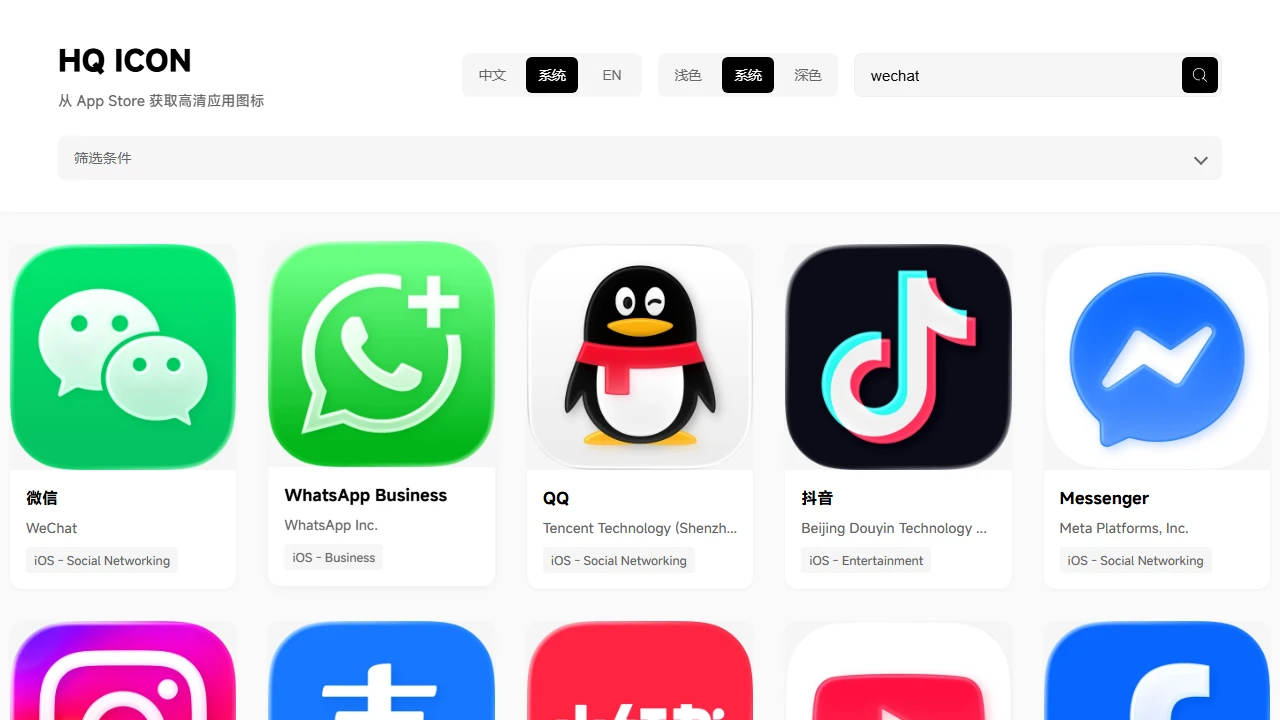
You don’t need complicated operations — just open your browser to use it. For example, if you want to extract the icon of a note-taking app for iOS, either search for the app name or directly paste the App Store link; the tool will automatically identify the corresponding resource, so you don’t have to manually select the system or version.

Its output formats are also designed for different scenarios: use WebP for web pages, as it has a small file size and doesn’t affect loading speed; use JPEG for printing, as it has good compatibility; use PNG for UI design, as it has an alpha channel that can be directly overlaid on other assets.

  • Cross-system coverage: can extract app icons for both iOS and macOS, no need to switch tools;
  • Flexible size selection: available in common sizes from tens of px to 1024px, choose as needed;
  • No extra barriers: no need to install plugins, no need to fill in information, just open and use.

For a practical example: if an operations team is making a tweet for an app collection and needs to combine icons of different apps, each icon must be clear. Using HQ ICON to search for each app name, you can save all required images in seconds, without having to take screenshots from the App Store and edit them one by one.

Who Is HQ ICON Most Suitable For?

UI designers often need to refer to icon details of other apps when creating prototypes; if high-quality icons can’t be found, the prototype will look rough. Using HQ ICON, you can quickly get the official original icons without having to search for resources on the developer’s website.

Operations teams doing product promotion need to create graphics for WeChat Official Accounts and Moments, where app icons are core elements. Using low-resolution screenshots would look unprofessional, but high-quality icons extracted with HQ ICON can be used directly without post-enlargement or editing.

Developers preparing for app launch need to organize icons of different sizes for testing or promotion. HQ ICON can get icons that meet Apple’s official specifications in one go, saving you from adjusting sizes manually and reducing errors.

Relevant Navigation

No comments

You must be logged in to leave a comment!
Login immediately
none
No comments...