
Graphics Card Bar
Graphics Card Bar is a player community for PC building exchanges and hardware discussions
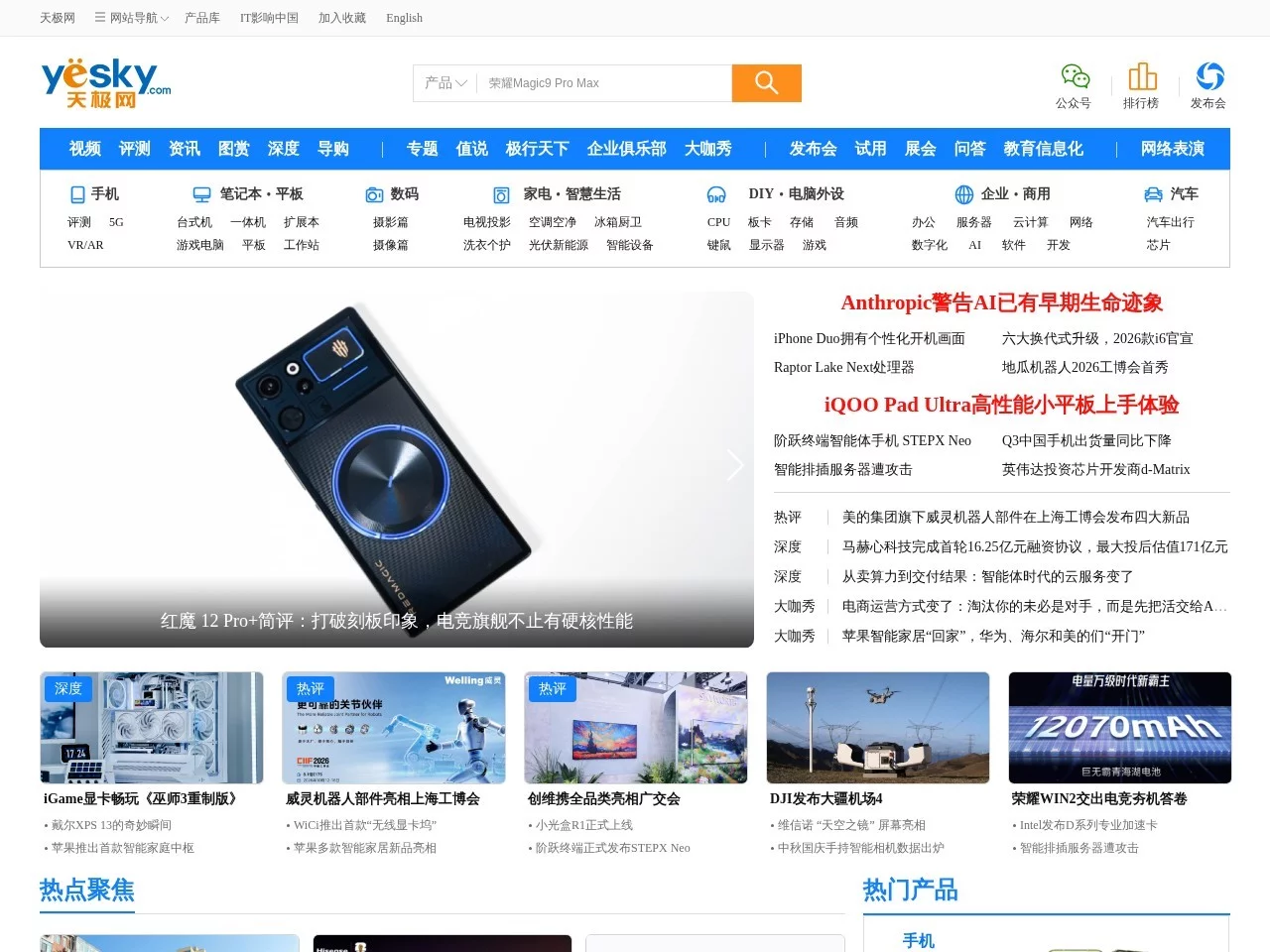
 Yesky
A high-quality information platform focusing on practical IT hardware content
Official website: https://www.yesky.com
When I built my first desktop PC, I was completely confused by the string of specs on e-commerce pages. Terms like “Core” and “DDR5” were just things I heard casually from people around me. I wanted to find content that was easy to understand, not the kind that’s paid to hype products. I looked around several places, but either the self-media outlets were full of paid promotional ads, or they just stacked specs that were impossible to understand. Later, I found this site Yesky, and it became a fixed place I go to every time I upgrade or build a PC.
What I like most about this site is that its DIY content is truly for ordinary users who want to build their own PCs, not the obscure specs for industry insiders, nor paid promotional articles. For example, when I look for a motherboard, it doesn’t just give cold spec tables. It will tell you what CPU the motherboard is suitable for, whether the entry-level version is enough for daily use, what makes the high-end version different, and even mention small problems that some models are prone to. For example, some entry-level motherboards only support newly released CPUs after BIOS updates. Such details are not officially mentioned, but old editors or frequent users will add them in the content.
Every time I upgrade my graphics card, I will first go to the GPU sub-section under the DIY section. The content here doesn’t mix with monitors, cases or even peripherals. It’s all practical content about graphics cards: for example, teardown analysis of newly released graphics cards, you can see which VRAM they use, whether the power supply phases are stable, and real buying guides for different price ranges. It won’t say nonsense like “blindly go for the flagship”, but will be based on ordinary users’ budgets and needs. For example, a budget of over 1000 yuan is suitable for playing what games, and a budget of over 2000 yuan is suitable for simple content creation. It won’t fool people with the specs of flagship models.
Compared with other similar platforms, this site rarely has exaggerated headlines like “XX is the best in the world”. Reviews will directly mention shortcomings, such as a graphics card with loud fan noise, or a motherboard with a network card that is prone to disconnection. It won’t only say good things to please manufacturers. Compared with several other well-known IT portals, many of them repost old content or copy-paste specs. The content here is really updated along with hardware iterations. For example, a newly released CPU will have compatibility tests and real experience reviews a few days later, instead of waiting a month or so to update content slowly. Also, compared with platforms that only do buying guides, this site not only has buying guides, but also the latest industry news, so you can learn practical information like new memory standards and new storage interfaces. You don’t just look at what you want to buy, you can also understand the basics, so you won’t be fooled by physical retailers.
There are also many small tips for using this platform, which I learned after making several mistakes: don’t just look at the homepage recommendations. Many of them are hot topics or commercial ads. The real practical content is hidden in each sub-section. For example, if you want to find content about CPUs, just click the CPU sub-section under DIY, instead of rummaging around the homepage wasting time. Don’t just look at the latest article, read content from different times. For example, a newly released graphics card may have user feedback about driver issues, which will be mentioned in reviews after a while. At that time, you can decide whether to wait for driver optimization before buying. Also, don’t ignore the comments. Many old users will add details that the official didn’t mention in the comments. For example, some motherboards’ M.2 slots share lanes, so installing an SSD will affect the graphics card’s bandwidth. Such key information may not be mentioned in reviews, but someone will say it in the comments. Also, don’t believe clickbait content like “must buy” or “blindly go for it”. Click in and check if the actual content matches your needs. For example, if you’re a student with a limited budget, don’t focus on content about flagship hardware, just look for the corresponding price range, otherwise you’ll get more and more anxious.
This platform is suitable for those who want to build their own PCs or upgrade hardware, don’t want to be misled by paid content, and are looking for reliable, practical information. It’s also good for ordinary users who want to learn about the latest hardware technology without having to read obscure specs. Of course, if you only like entertainment-focused IT gossip or mindless hype, this might not be for you, as its content is more practical and not too flashy.