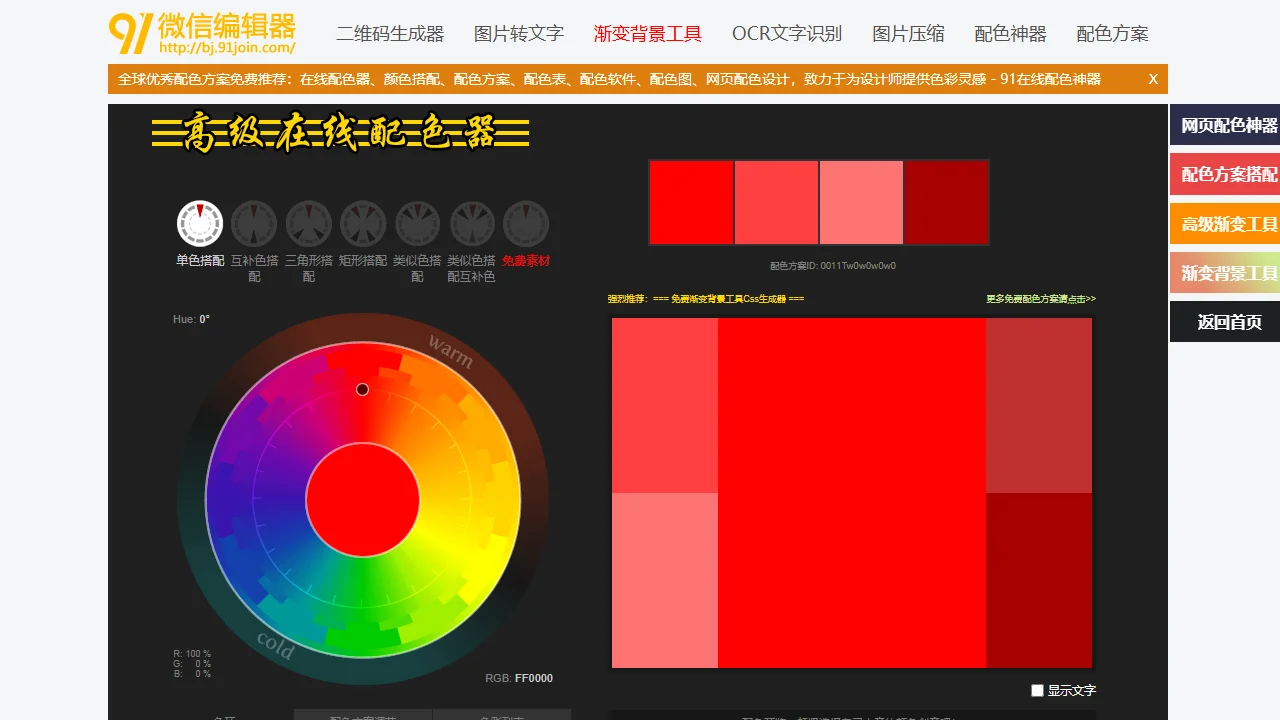
Colour Scheme Tool91 WeChat Editor online colour scheme tool, colour schemes
Screenshots

In WeChat article content creation, colour matching directly determines the visual appeal and reach of your content, yet many operators often struggle due to a lack of colour inspiration and overly complex professional tools. The Colour Scheme Tool launched by 91 WeChat Editor is a professional colour assistant built precisely to solve this pain point, helping users efficiently complete the colour beautification of WeChat articles — you can work out a suitable colour scheme without any professional design background.
Core Features and Practical Value of the 91 WeChat Editor Colour Scheme Tool
Official website: http://bj.91join.com/color.html
This colour scheme tool is not just a simple colour picker, but a comprehensive tool that integrates professional design capabilities with scenario-based helper functions. It not only offers thousands of popular colour scheme references but is also linked with the 91 gradient background tool, supporting the online creation and editing of gradient backgrounds. Whether it is colour design for WeChat Official Account articles, Mini Program pages or personal web pages, you can find a suitable solution. It quickly provides colour inspiration for designers and content operators, reducing the time cost of colour trial and error.
Key Feature Highlights
- Online colour scheme table: covers the most popular colour combinations of the moment, spanning warm tones, cool tones, Morandi palettes and many other styles. Users can quickly filter suitable combinations according to their content theme, without having to work out colour logic from scratch.
- Web and WeChat article compatibility: as a professional web colour design tool, its colour parameters are adapted to the display rules of the WeChat Official Accounts Platform, avoiding display deviations on mobile. It also meets the colour design needs of ordinary web pages, covering both content creation and basic web design scenarios.
- Integrated helper tool matrix: besides the core colour matching features, it also has built-in tools such as online quick formatting, an SVG editor, a QR code generator, image compression, OCR text recognition and GIF creation, covering the entire WeChat article editing workflow. From colour adjustment to content optimisation, everything can be done in one place without switching between multiple tool pages.
Colour Scheme Tool Workflow and Usage Tips
Many users worry that professional tools are complicated to operate, but the design logic of the 91 WeChat Editor Colour Scheme Tool fits the habits of ordinary operators. Even first-time beginners can get started quickly. The whole workflow is built around the needs of WeChat article editing, with clear steps and no steep learning curve.
Basic Usage Steps
- Log in and enter the tool: visit the official homepage of 91 WeChat Editor. After logging in to your account, you can find the Colour Scheme Tool entry directly in the left-hand function bar — no extra registration or software download required, as it is fully online.
- Select styles and adjust colours: once in the editor interface, first select the article style module you want to modify, then switch to the colour tool panel. From there you can apply an online colour scheme or manually adjust colour parameters, and combine it with the gradient background tool to design personalised visual effects.
- Fine-tune and preview: after adjusting the colours, you can also tweak details such as letter spacing and fonts, use the preview function to check how it actually displays on mobile, and once confirmed, simply save to apply it to your WeChat article content.
Practical Tips to Boost Efficiency
Beyond the basics, mastering a few tricks can make the Colour Scheme Tool even more effective. For example, when choosing a colour scheme, consider the tone of your content: for festival marketing content, high-saturation contrasting colours work well, while low-saturation Morandi palettes suit knowledge-sharing content, letting colour better serve the content’s message. Also, when using the gradient background tool, choose a gradient that contrasts with the text colour — this both highlights the text and enhances the overall visual hierarchy.
Colour Scheme Tool Use Cases and User Value
Whether you are an individual content creator running a WeChat Official Account, an operator managing a corporate WeChat account, or a small design team, the 91 WeChat Editor Colour Scheme Tool delivers practical value. For operators without a professional design background, it lowers the barrier to colour matching and prevents poor colour choices from undermining content reach; for professional designers, it serves as an assistant offering inspiration, reducing repetitive basic colour work and freeing up more energy for creative content.
In the visual competition of WeChat articles, colour is the most direct element of expression. By integrating professional features with scenario-based design, this tool makes colour beautification efficient and simple, becoming a practical assistant for WeChat content creation and operation, and helping users quickly boost the visual appeal of their articles.