AD Recommendation
Join Now
Important: Please do not trust the content and ads of various websites easily! Recommended reading: Safety Tips
Coocolors
Scan to visit on your phone
3wks agoupdate 540 00
0

CoocolorsCoocolors

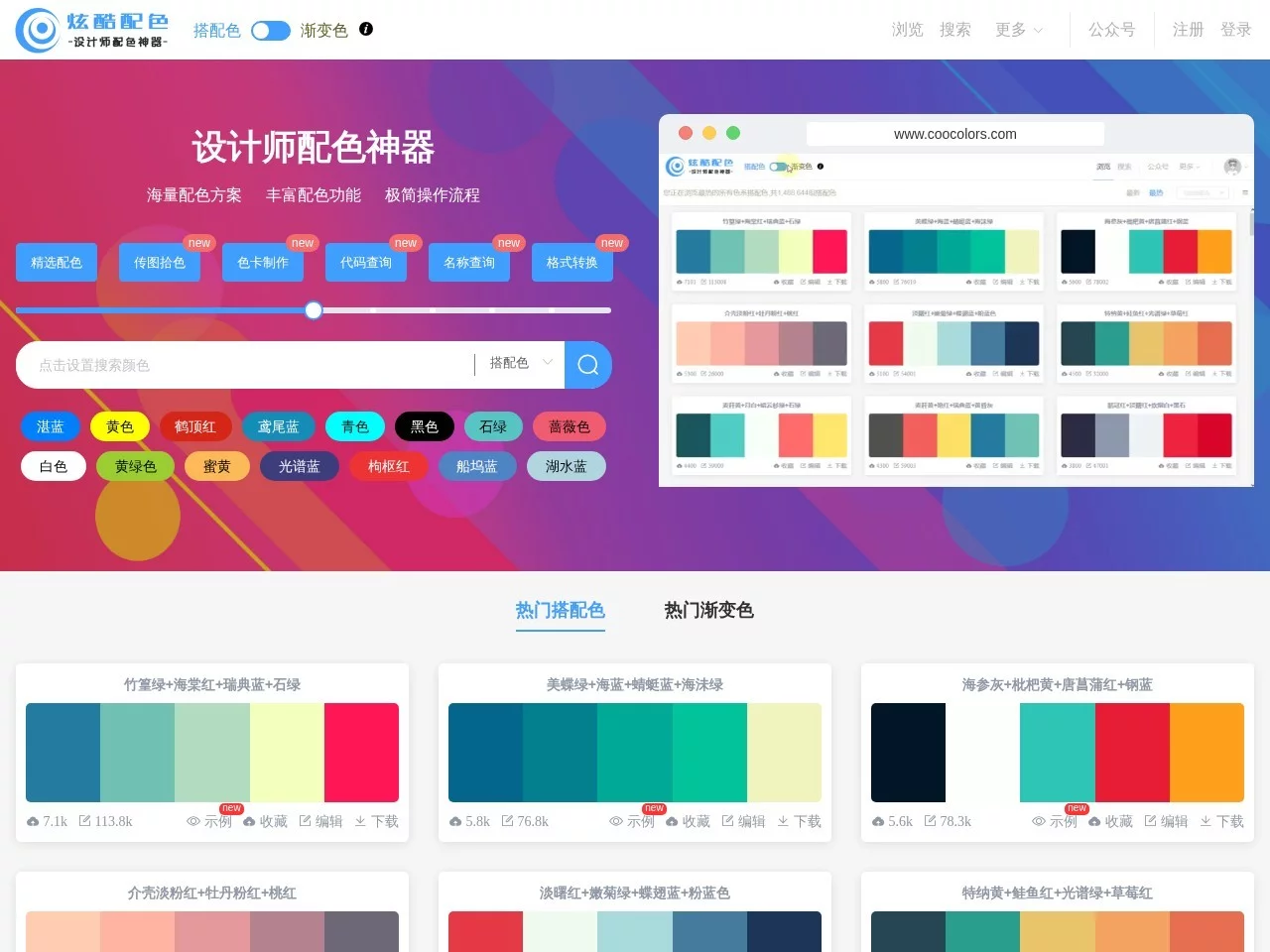
Coocolors focuses on colour matching services, providing functions such as colour matching scheme query, image colour extraction, colour card creation and download, colou...


Screenshots

Coocolors

A Must-Have Tool for Professional Designers to Boost Colour Matching Efficiency: An Analysis of Coocolors

In various design scenarios such as graphic design, UI design, and illustration creation, the precision and adaptability of colour matching directly determine the final presentation of the work. For designers, a colour matching tool that can cover all scenario needs can significantly reduce the time cost of early communication and adjustment. Coocolors, as a one-stop professional colour matching platform designed exclusively for designers, has become a core tool for many designers to improve their creation efficiency, thanks to its flexible functional design and massive resource reserves.

Official Website: https://www.coocolors.com/

Core Features: Multi-dimensional Colour Matching Schemes Covering All Creation Scenarios

Many designers encounter pain points when inputting colours from different sources during colour matching, such as picking colours from reference images, using specific brand colour codes, matching colour card standards, etc. Coocolors has designed flexible search methods to address these needs, covering almost all common colour input paths. Whether you need to pick colours by uploading an image to extract precise colour values from reference images, input professional colour codes like Pantone colour cards or Copic markers, or query various colour value formats such as HEX, RGB, CMYK, all operations can be completed quickly to adapt to colour collection needs at different design stages.

  • The image-to-colour-picking function supports importing various reference images, extracting colour values at any point with one click, and is suitable for extracting inspiration colours from excellent works and real-scene materials;
  • Professional colour code matching covers the full range of Pantone colour cards and Copic marker codes, meeting the professional colour value requirements of different fields such as printing and hand-drawing;
  • Full-format colour value query supports mainstream colour value formats such as HEX, RGB, HSV, HSL, LAB, CMYK, etc., adapting to different import needs of design software.

Detail Optimisations and Professional Output Capabilities for All Users

The audience of design works includes users with different visual conditions, so colour matching must take into account the visual experience of people with colour weakness and colour blindness. Coocolors has addressed this industry pain point by adding colour blindness and colour weakness mode previews and colour matching optimisation functions. Designers can switch between different visual modes in the tool to view the presentation effect of colour matching schemes under various visual conditions, and can also optimise colour matching combinations with one click to ensure the usability of works covers more people and meets the relevant requirements of accessibility design.

In addition to adjusting colour matching schemes, Coocolors’ custom export function can adapt to the needs of various design software and scenarios, solving the import adaptation problem of colour matching schemes between different tools. Whether you need to export Adobe ASE format swatches for Photoshop, Illustrator, export SCSS style files for front-end development, export Copic or Pantone colour card files for hand-drawing and printing, or even export colour card preview files in SVG, PNG, PDF formats, and TXT documents of colour values such as HEX, RGB, all exports can be completed with one click, without manual format adjustment, greatly improving post-production efficiency.

Practical Value for Designers at Different Stages

For novice designers who are just starting out, Coocolors can reduce the trial-and-error cost of colour matching. Novices do not need to spend a lot of time learning complex colour matching theories; through the tool’s massive library of colour matching schemes, they can quickly find colour matching combinations that adapt to different styles, and then combine with the tool’s adjustment functions to quickly produce works that meet the requirements. For senior designers, this tool can improve work efficiency, eliminating the need to spend time on basic operations such as colour format conversion and colour card adaptation, allowing them to focus more on creative conception and work optimisation.

Practical Tips for Using Coocolors

Many designers tend to fall into the trap of relying too much on tools when using professional colour matching tools; in fact, they can flexibly use Coocolors’ functions in combination with their own design habits. For example, in the early stage of a project, you can use the image-to-colour-picking function to extract the benchmark colours of the brand VI, and then use the colour code matching function to confirm the accuracy of the colour values; in the scheme adjustment stage, optimise the readability of colour matching through colour blindness mode preview; in the project delivery stage, select the corresponding export format to directly adapt to the needs of the client or development team, so as to maximise the value of the tool while maintaining the dominance of their own design creativity.

Relevant Navigation

No comments

You must be logged in to leave a comment!
Login immediately
none
No comments...