AD Recommendation
Join Now
Important: Please do not trust the content and ads of various websites easily! Recommended reading: Safety Tips
Fluent Emoji Maker
Scan to visit on your phone
4wks agoupdate 616 00
0

Fluent Emoji MakerFluent Emoji Maker

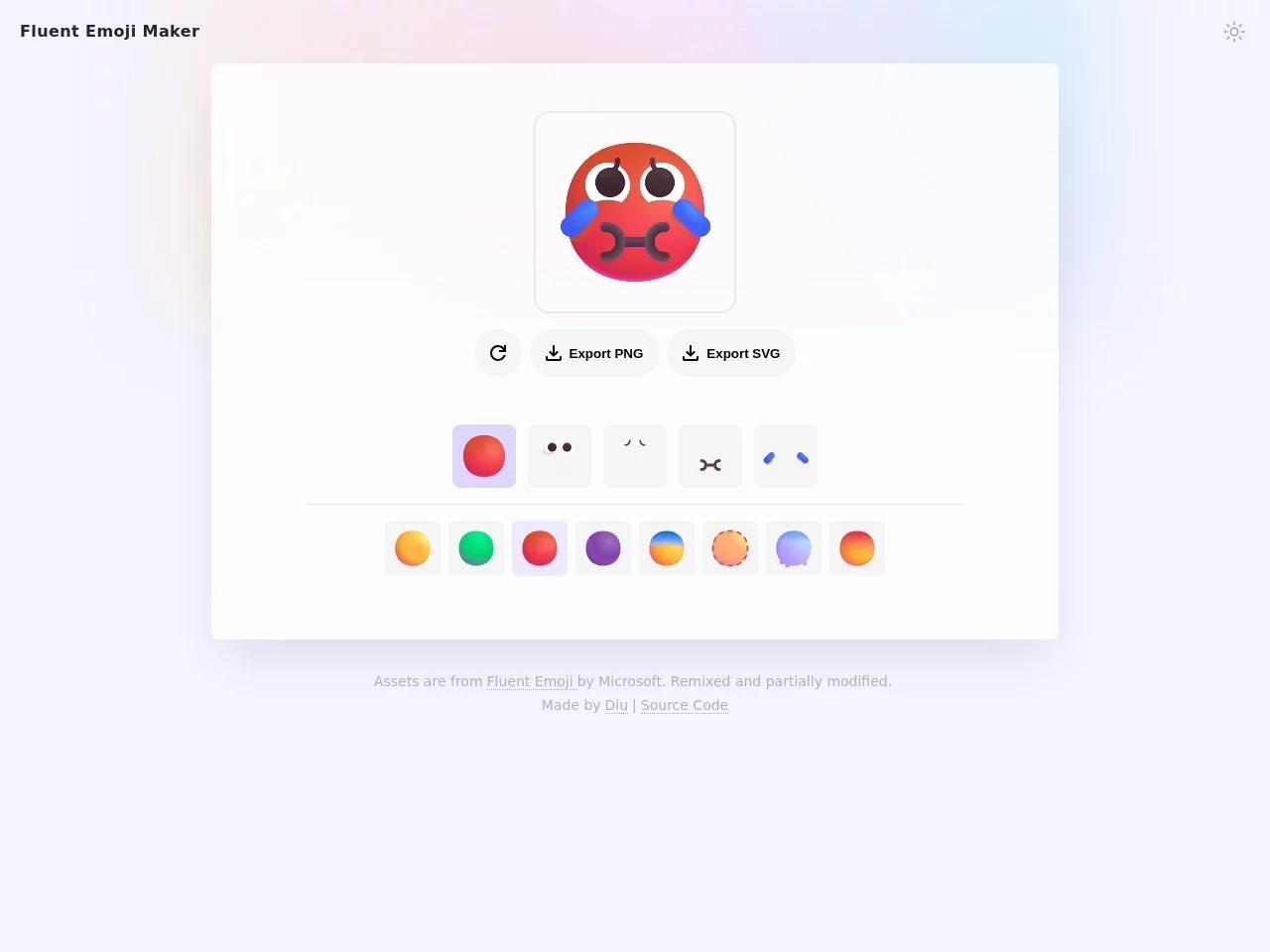
Fluent Emoji Maker is an online tool for customising and generating Fluent Emojis. Users can "sculpt a face" and create personalised emojis by selecting different compone...


Screenshots

Fluent Emoji Maker

Emojis have long been more than just embellishments in chats — they carry the emotional warmth of a product and directly affect the overall look and feel of an interface. Fluent Emoji Maker is an online tool born precisely for this need — based on Microsoft’s open-source Fluent Emoji set, it lets anyone freely combine facial features in the browser to “sculpt” a personalised emoji of their own, with no design background required.

Ready to Use Straight Away: An Emoji-Making Tool That Runs in the Browser

Official website: https://fluent-emoji.ddiu.io/

Unlike many image tools that require downloading an installer, Fluent Emoji Maker runs entirely on the web. Open the link, pick and combine components, save the result — a creation is complete in three steps, with no tedious steps such as registration or login in between, making it especially friendly for temporary, lightweight emoji needs.

Its positioning is also quite focused: rather than pursuing all-in-one image-editing capabilities, it polishes the single task of “combining Fluent Emoji elements” until it is smooth enough. Microsoft’s Fluent Emoji is known for its modern, clean art style, so customising on top of this asset set gives the result a naturally consistent visual character, well suited to dropping straight into design drafts or project interfaces.

Three Paths: From Quick Combination to Deep Customisation

Path One: “Sculpt a Face” Directly on the Panel

The tool offers an intuitive visual combination interface, and its core gameplay is like building blocks. You can freely choose from the following dimensions:

  • Facial contour: determines the base shape and overall character of the emoji;
  • Glasses: from ordinary frames to distinctive styles, giving the emoji different personalities;
  • Mouth: adjusting the mouth shape switches the emotional tone — happy, surprised, aggrieved and more;
  • Emoji decorations: layer on various decorative elements to make the emoji more dramatic and recognisable.

All elements come from the official Fluent Emoji asset system, so even random combinations rarely look out of place — this is the key that sets it apart from ordinary image-stitching tools.

Path Two: Export to Figma for Further Polishing

If you have higher demands for detail, the tool supports interaction with Figma. Designers can take the generated emoji into Figma for further creation, flexibly adjusting colours, proportions and other details before integrating it into their own body of work — the creative workflow links up quite naturally.

Path Three: Get the Source Code and Modify It Yourself

This is an out-and-out open-source project, with the code hosted on GitHub: https://github.com/ddiu8081/fluent-emoji-maker. Users with development skills can download the source code for custom development or feature extensions — for example, integrating their own asset library, adjusting the interaction logic, or even deploying it as an in-house emoji generator for their team.

A Solid Foundation: Four Highlights of the Fluent Emoji Asset Library

Making emojis is just the surface experience; what truly supports this tool is the mature Fluent Emoji asset system behind it:

  • Cross-platform compatibility: provides Unicode emoji support and can be easily integrated into all kinds of applications;
  • Multi-style adaptation: covers modern, flat, high-contrast and other styles, matching a wide range of design scenarios;
  • Smart loading mechanism: shows an animated transition while emojis load, and automatically falls back to a text emoji if loading fails, ensuring no gaps appear in the interface;
  • Broad applicability: whether for design or development projects, common emojis can be inserted quickly.

At present, well-known open-source projects such as Lobe Chat and Lobe Theme have already integrated this emoji asset set to provide high-quality interface emojis. This also indirectly validates its stability and expressiveness in real product environments.

Who Is Best Suited to Get Started?

  1. UI / visual designers: those who need to quickly add consistently styled emoji assets to digital projects — combine with the tool, fine-tune in Figma, then deliver;
  2. Independent developers: those who want to add emoji features to their apps or websites — directly reusing Fluent Emoji assets can greatly reduce implementation costs;
  3. Open-source communities and product operators: those who want to customise a memorable set of mascot emojis for their project, enhancing the community atmosphere and the product’s appeal;
  4. Casual users: those who simply want to sculpt a few fun emojis for social occasions — open the web page and start playing, with zero barriers.

One tool + one asset library: Fluent Emoji Maker handles personalised creation while Fluent Emoji provides the rich base material — together they cover the complete emoji workflow from inspiration to delivery.

A Few Common Questions Before Getting Started

Does It Cost Anything?

The tool itself is freely accessible via the official website, and the project is released as open source, so there is no barrier to use — whether online or for local modifications.

Can I Use It Without Design Experience?

Absolutely. The “face sculpting” panel simplifies creation into component selection — just pick facial features, glasses, mouth and decorations one by one. It is WYSIWYG, and the cost of failure is nearly zero.

Will the Project Keep Being Updated?

Judging from the repository activity, the project has been iterating on the user interface and feature details (such as optimisations like loading branch information), with the user experience continuously improving. To follow the latest progress, simply watch the GitHub repository.

If you are planning to add a set of consistently styled emojis to your design drafts, personal projects or open-source works, why not try sculpting one on the official website first — a few minutes later, a face that satisfies you may well be born.

Relevant Navigation

No comments

You must be logged in to leave a comment!
Login immediately
none
No comments...