Online Image ToolboxMake image processing simpler
Screenshots

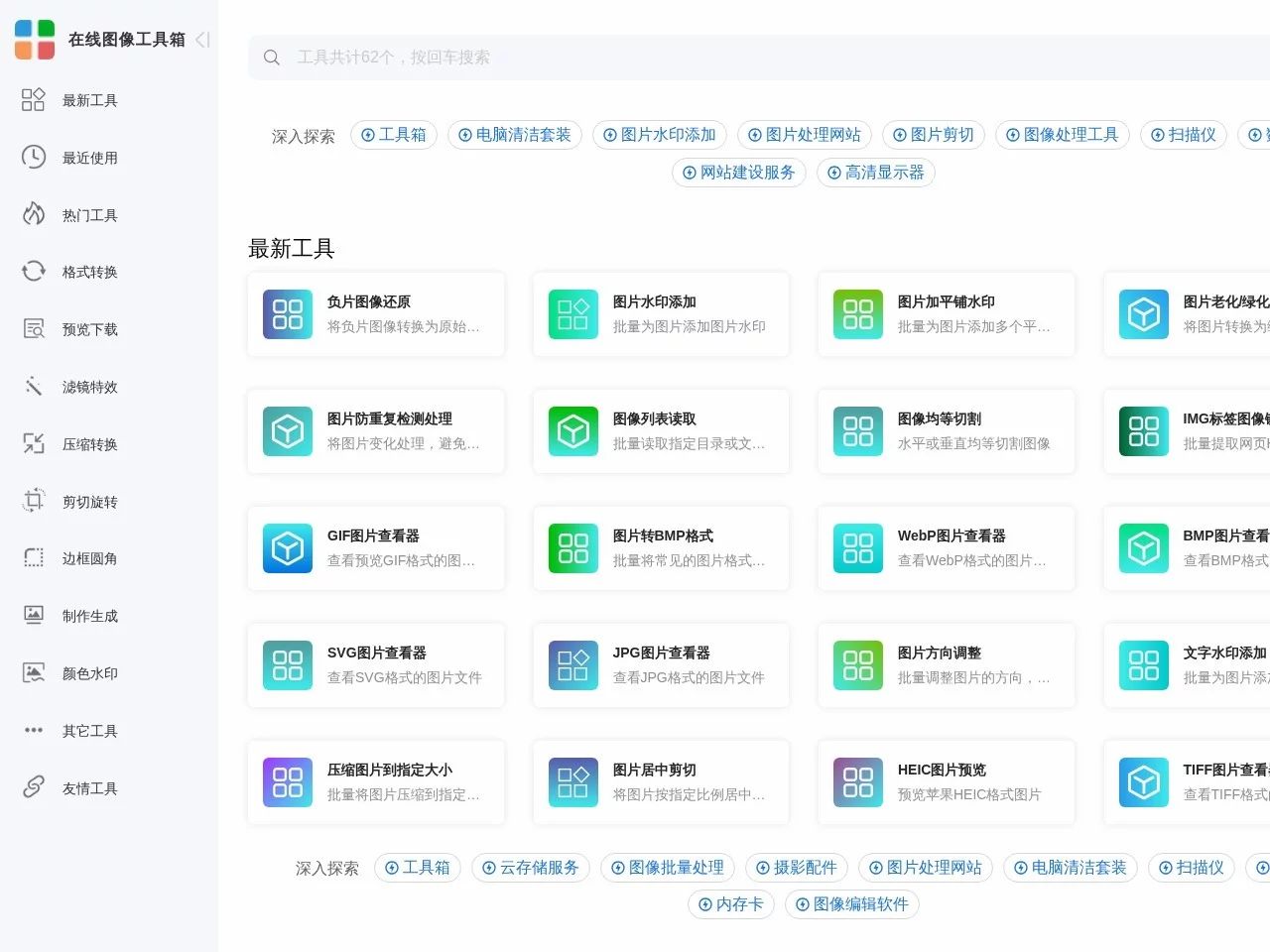
Say goodbye to reliance on photo editing software — the online image toolbox solves daily image processing pain points
When creating e-commerce product detail pages, you need to batch compress main images; before writing a WeChat Official Account post, you need to uniformly crop cover dimensions; before posting social media works, you need to add exclusive watermarks to photos… These trivial yet frequent image processing tasks used to require downloading and installing multiple desktop software, which not only takes up device space but also requires time to learn the software operation logic, making the threshold extremely high for users with zero design foundation. The emergence of the online image toolbox has completely broken this limitation. It is a professional browser-based image processing platform with dozens of practical tools built-in, covering most image processing scenarios in work and life, helping users efficiently complete various image tasks, even newbies with no design foundation can easily get started.
Official website: https://phototool.cn/
Compared with traditional desktop photo editing software, the biggest advantage of the online image toolbox is lightweight, convenient and ready to use: no need to register or log in, nor download or install any client. Open the webpage to directly select tools to process images, and you can directly download the finished product after processing. It is suitable for temporary tasks and batch image processing needs.
Full-scenario functions to meet the needs of individual and professional users
The function design of the online image toolbox is based on real usage scenarios, and both individual users and professional designers can find suitable tools. The core functions cover all high-frequency needs of daily image processing, and some representative tools are as follows:
- Image Compression: Perform lossless or light compression on large-volume photos, reducing file volume without significantly affecting image quality, making it convenient for image uploading, transmission and storage;
- Image Cropping: Support custom size ratios, quickly adjust image composition, and adapt to size requirements of different scenarios such as WeChat Official Account covers, e-commerce main images, social media avatars, etc.;
- Image Rotation: Correct images with wrong orientation with one click, support rotation at any angle, suitable for processing photos with incorrect orientation settings during shooting;
- Filter Application: Provide various style filters, quickly change the tone of photos, and enhance image texture without professional photo editing skills;
- Watermark Addition: Support adding text and image watermarks, adjust the position, transparency and size of watermarks, helping users add exclusive marks to works and protect original content.
In addition to the above basic tools, the online image toolbox is continuously expanding its function library. Users can feedback personalized image processing needs to the official. After research and evaluation, relevant tools will be developed and launched if they have practical value. This user-demand-driven iteration model makes the functions of the toolbox more and more fit the actual usage scenarios of different users, and the practicality continues to improve.
Zero-threshold operation + multi-device adaptation, process images efficiently anytime, anywhere
The usage process of the online image toolbox has almost no learning cost. Even first-time users can quickly complete operations through page prompts. The specific steps are as follows:
- Open the online image toolbox website and select the required image processing function from the tool list;
- Upload the images to be processed according to the page guidance, adjust parameters as needed, and complete processing;
- After processing, download the finished image to your personal device for use.
In terms of device compatibility, the online image toolbox supports desktop computers, laptops, tablets and smartphones and other terminals. Whether in the office, at home or outdoors, you can process images anytime, anywhere to meet usage needs in different scenarios.
Tip: Although the tool can also be used normally on mobile phones, the official has optimized the interaction and performance for desktop computers. The interface layout is clearer and the operation is more convenient. It is strongly recommended to use it on a computer for a better processing experience.
Transparent pricing rules, more cost-effective to choose as needed
Many users worry about charges and function limitations when using online tools. However, the pricing rules of the online image toolbox are very transparent: free users can enjoy a certain number of image processing times, all functions are exactly the same as paid users, with no function limitations at all. The only difference is that there is a certain limit on the number of images processed simultaneously at one time.
Users can choose the appropriate plan according to their own usage needs: if you only process a few images occasionally, the free quota can basically meet the needs; users with large-volume image processing needs such as e-commerce operators, self-media creators, graphic designers, etc. can choose the corresponding subscription plan according to actual usage, investing costs as needed, which is more cost-effective than purchasing other photo editing tools separately.
Privacy and copyright protection, more peace of mind when processing images
Image data security guarantee
Regarding the privacy of image uploads that users care about, the online image toolbox clearly promises: all uploaded images are only used for the current processing, will not be stored on the server, and will be immediately deleted from the server after processing, so the content of users’ images will not be leaked, ensuring the privacy and security of personal and commercial images.
Commercial usage rights of finished products
Both free users and paid users can use the processed images normally for personal and commercial purposes, without worrying about copyright issues. Users can rest assured to use the processed images in scenarios such as e-commerce product detail pages, self-media content, commercial design, etc.