Color HuntColor Hunt (colorhunt.co) is an online platform dedicated to colour inspiration, offering a rich collection of palette resources for designers, artists, developers, and a...
Screenshots

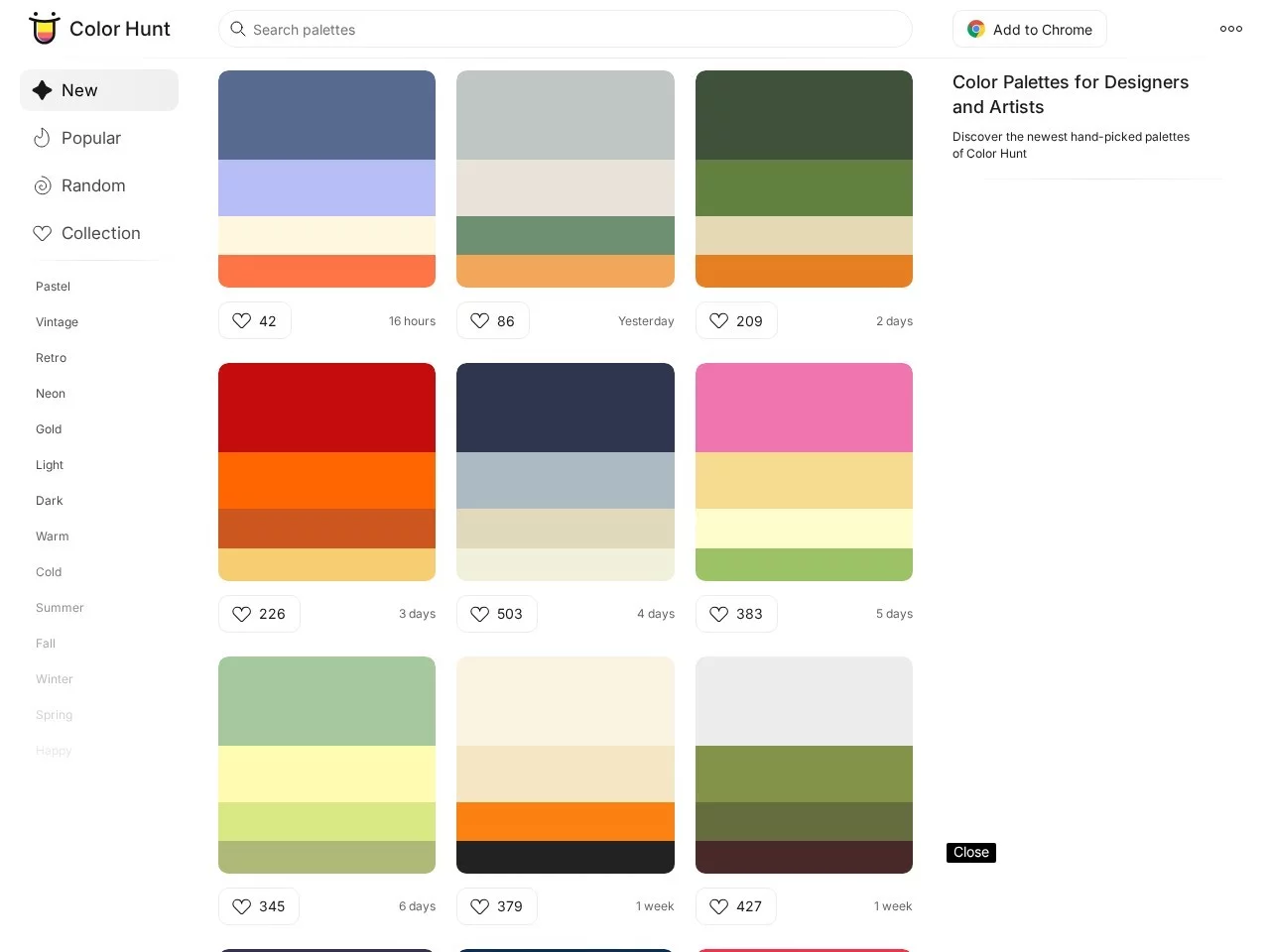
If you often get stuck on colour schemes while designing, you have probably run into this: staying up until the early hours trying to pair warm tones with a food illustration, only to find your saved swatches are either too grey or too garish, and searching the whole web turns up either outdated old schemes or professional colour values locked behind a paid membership. Color Hunt was created to solve exactly this pain point. It is not one of those scattered swatch collections meant only for reference — it is a colour inspiration site built by designers around the world, with palettes you can use straight away.
No more rummaging for palettes: Color Hunt’s core features deliver
Official Website: https://www.colorhunt.co/
A while back I helped a friend make promotional posters for her bakery, and Color Hunt saved me a whole afternoon. There is no need to register an account — open the page and you can see the newly updated palettes, or click the “Food” tag straight away. Its categories are not vague labels like “warm tones”; they are practical, scenario-based tags: pick “Outfits” for clothing, “Universe” for space themes, “Winter” for winter illustrations. You do not have to gamble on a jumble of random colours — that is what makes it so hassle-free.
Once you have picked a palette and clicked into it, there is no need to look up the values yourself — the page lists professional RGB and hex values directly. I copied the values straight into Photoshop at the time and never ran into colour shift issues, which saved me a lot of the hassle of manual colour picking. If a ready-made palette does not feel quite right — say you want to add a touch of warm purple to a space theme — you can tweak it on the platform itself without switching to other software, then save it as your own scheme or submit it to the community for feedback from other designers.
Practical details that work for beginners and seasoned designers alike
When I was just learning design, I always worried about finding palettes that did not suit the context, but Color Hunt’s coverage really is comprehensive. Pick one of its schemes for an app interface and the values are ready to use; for illustration colour pairing, its combinations never feel too jarring; I have even helped my mum’s friend pick curtain colours for a home renovation here, finding a beige-brown tone that suited pale grey walls — it even covers home furnishing needs.
The community vibe is quite interesting too — it is not a cold, impersonal tool, but a place where designers from around the world gather to share. I once submitted a milk-tea colour scheme I had mixed myself, and within days another designer left a comment saying they had used it on packaging and posted a photo of the finished product. That kind of two-way inspiration exchange is far more fun than racking your brains alone.
A truly free design tool with no strings attached
I have seen plenty of design tools that either charge for basic features or are plastered with ads blocking your view. Color Hunt has none of these problems: every feature is completely free, you can use it without registering, and there is not even a single pop-up ad. The official site opens to a clean page with the latest and most popular palettes right at the top. Beginners do not need a tutorial — just click a tag, pick a category, and copy the values; you can find a usable scheme in minutes.
When I previously helped a web designer friend build pages, he always said Color Hunt’s palettes can be used without modification — they match users’ visual habits when browsing the web, neither too glaring nor too dull. When I make posters myself, I also check the popular palettes first; combinations recognised by designers around the world make a reliable starting reference and help you avoid the trap of “pretty colours that are not practical”.
Handy tips for using Color Hunt that save time and deliver results
You do not actually have to browse aimlessly every time — two little tricks can help you find the right palette faster. If you are up against a deadline, search “popular palettes” directly; those are tried-and-tested combinations vetted by everyone, so you do not have to rack your brain. If you want fresh inspiration, browse the “new palettes” daily — the platform adds new schemes every day, so you will not clash with anyone else’s colours.
Whenever I design now, I open Color Hunt first. I no longer need to build up my own swatch collection or hunt around for free colour value tools, and the time saved goes into polishing the details of my work. Whether you are a newcomer just picking up the drawing board or a veteran designer with five or six years under your belt, you will find usable palettes here and never again waste time getting stuck on colours.