AD Recommendation
Join Now
Important: Please do not trust the content and ads of various websites easily! Recommended reading: Safety Tips
Adobe Color
Scan to visit on your phone
4wks agoupdate 746 00
0

Adobe ColorAdobe Color

An online colour tool launched by Adobe, designed to help designers and creative professionals create, explore, and share colour schemes.


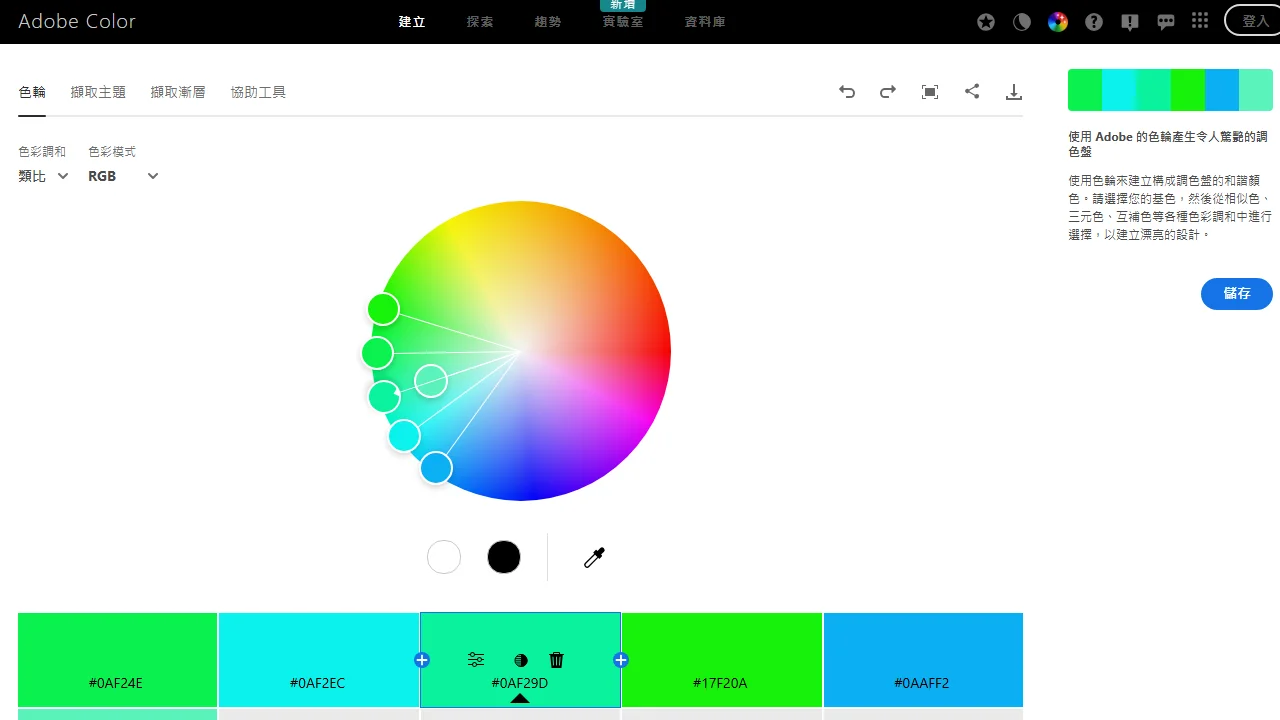
Screenshots

Adobe Color

In the field of creative design, colour is the core factor that determines the quality and appeal of a work. Many designers have seen their project efficiency suffer due to issues such as unbalanced colour combinations and cross-media colour deviations. As a professional online colour solution, Adobe Color, with its full-process feature set, has become the core tool for designers to complete colour work efficiently, helping creative professionals quickly create harmonious colour schemes that suit multiple scenarios.

Adobe Color Core Features: Full-Process Colour Support from Exploration to Implementation

Official website: https://color.adobe.com/zh/

For designers, colour work often requires balancing inspiration gathering, rule compliance and scenario adaptation. Adobe Color’s feature set is built around these needs, covering the whole process from colour exploration to scheme implementation. Unlike ordinary colour tools that only offer a single colour-mixing function, it integrates capabilities such as intelligent exploration, scientific rules and cross-media adaptation, so that design needs at different stages can all be met.

Intelligent Colour Exploration: An Efficient Way to Break Through Creative Blocks

Many designers often hit the bottleneck of “not being able to come up with a suitable colour scheme”, and Adobe Color’s intelligent colour exploration feature can effectively solve this problem. Users can manually adjust hue, saturation and brightness through the interactive colour wheel to visualise colour combinations, or upload any image — the tool will automatically extract an accurate palette, turning the good colours in the image into editable colour schemes without having to start from scratch.

Scientific Colour Rules: Professional Support to Avoid Pitfalls

Novice designers are prone to falling into the trap of chaotic colour combinations, while professional designers need to quickly generate harmonious schemes that follow visual logic. The scientific colour rules built into Adobe Color meet the needs of both groups. The tool offers a variety of preset colour logics including monochromatic, complementary, analogous and triadic. Based on colour psychology and design aesthetics, these rules allow users to quickly generate harmonious and appealing colour schemes simply by selecting the corresponding rule, without repeated trial and error.

Adobe Color for Diverse Scenarios: Ensuring Colour Consistency from Digital to Print

Design projects often involve different media — web pages, UI interfaces and printed materials all have different colour requirements, and colour mode deviations can greatly diminish the presentation of a work. Adobe Color’s multi-mode conversion and cloud integration features ensure colour consistency across scenarios, allowing designers’ colour schemes to be rendered accurately on any medium.

Multi-Mode Colour Conversion: Meeting All-Media Needs

Different media correspond to different colour modes: web design commonly uses RGB, printed materials require CMYK, and professional design may also use the Lab mode. Adobe Color supports conversion between mainstream colour modes such as RGB, CMYK and Lab. Users can quickly switch colour modes according to project needs, ensuring colour accuracy in different output scenarios and avoiding colour distortion caused by mode mismatch.

Cloud Storage and Creative Cloud Integration: Boosting Work Efficiency

Designers need to access and sync their colour schemes at any time. Adobe Color’s cloud storage feature allows users to save created colour schemes to their personal library. It is also deeply integrated with Adobe Creative Cloud — users can sync colour schemes directly to commonly used design software such as Photoshop and Illustrator without exporting or importing, achieving a seamless transition from online colour work to creation in software and greatly improving work efficiency.

Adobe Color Inspiration Sharing Platform: A Bridge Connecting Global Design Creativity

Acquiring creative inspiration is an important part of colour work. The global inspiration sharing platform built by Adobe Color provides designers with a convenient channel for exchanging inspiration. Users can browse quality colour schemes shared by designers around the world. Covering different styles and scenarios, these schemes help designers quickly grasp cutting-edge colour trends in the industry. Users can also upload their own colour schemes or works to share creative experience and expand their creative thinking through exchange.

Whether it is web design, UI/UX design or DTP layout and other diverse design scenarios, Adobe Color can provide targeted colour support. Novice designers can get started quickly with preset rules and avoid common colour pitfalls, while professional designers can improve efficiency on complex projects through precise colour tools and efficient integration. It can both meet the need to quickly generate basic colour schemes and support the professional requirements of optimising complex schemes, becoming an indispensable colour assistant in designers’ daily work.

Relevant Navigation

No comments

You must be logged in to leave a comment!
Login immediately
none
No comments...