
AD Recommendation
Join Now
Important: Please do not trust the content and ads of various websites easily! Recommended reading: Safety Tips
google fonts
Scan to visit on your phone
4wks agoupdate 857 00
0

google fontsgoogle fonts

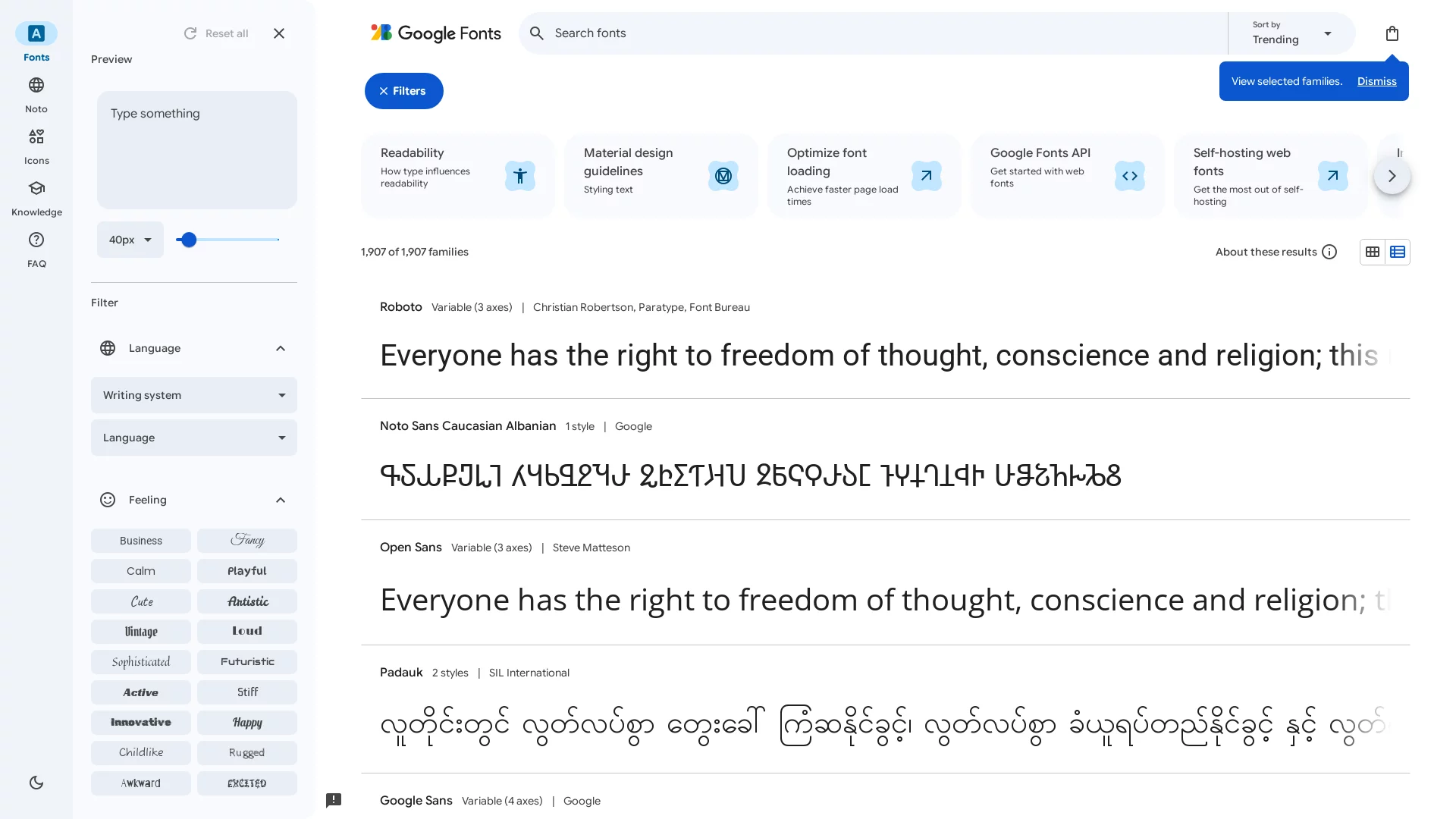
A free, open-source online font library provided by Google


Screenshots

google fonts

Google Fonts is not an ordinary site where you can only download fonts — it is a free, open-source font library that designers and developers can actually put to use, setting it apart from many font platforms that require payment or come with copyright restrictions.

Get clear about your needs first

Official website: https://fonts.google.com/

Many people use it first and foremost for its all-scenario coverage. Whether you are only building a personal blog or creating an official website for a brand, its fonts can cover it. Formal sans-serif faces for business contexts, distinctive handwriting styles for creative projects, and even decorative display fonts — you can find them all here, with no need to hunt around for scattered resources.

That said, whether to choose it or another platform depends on your specific needs. For example, if you are working on a commercial project, Google Fonts’ free, open-source nature is very practical — no copyright concerns, which is far less hassle than font sites that are free for personal use but charge for commercial use. However, if you are only doing personal assignments, some niche font sites can also do the job, just with fewer features.

Choosing it or another font library comes down to these core points

Start with usage rights. All fonts indexed by Google Fonts — whether for personal or commercial use — require no extra payment and raise no infringement worries, which saves a lot of trouble for cost-conscious small teams and individual creators. But on some niche font sites, the free fonts are for personal use only, and commercial use costs extra — a big difference.

Then there is the technical edge. Google Fonts distributes fonts via a public CDN: once you embed its code into your website, fonts load from the nearest nodes around the globe. For high-traffic websites, this reduces the strain on your own server and speeds up page loading. With many other font sites, you have to upload font files yourself, which not only takes up server space but can also slow down loading.

  • CDN acceleration vs local upload: With Google Fonts, you do not have to manage font file storage and distribution yourself, saving operational effort; with local uploads, although you keep control, large font files slow down your website and can cause crashes under high traffic.
  • Online preview vs download and install: On the Google Fonts official website, you can type custom text, adjust size and weight, and even preview colour fonts without downloading anything; many other font sites require downloading and installing first, then placing them into your project — a high trial-and-error cost, and they take up disk space.
  • Code integration vs manual import: Google Fonts lets you copy code straight into your project or deploy it via the official API within seconds, working for both static pages and dynamic applications; most other platforms require manually downloading font files and importing them one by one, which takes considerable time to adapt to different projects.

Don’t fall into these real-world pitfalls

It has plenty of classic typefaces. For example, Playfair Display is elegant and highly readable, ideal for headings and posters; Dancing Script has a lively style, perfect as an accent for brand identities or creative content. These fonts can make ordinary text stand out instantly.

However, there are two details to watch when using it. One is access: its servers are located overseas, so users in mainland China need a VPN or other circumvention tool to access it normally — if you are not prepared when a project is urgent, it can cause delays. The other is font compatibility: most English fonts cannot be applied directly to Chinese text, and some fonts for less common languages may render differently across devices or browsers. Testing should cover mainstream devices and browsers, or problems will arise.

Some developers combine it with website-building platforms like WordPress or Shopify, where plugins allow quick integration without manually writing code to swap fonts. But for projects where you write the code yourself, you will need to copy and embed the code — at that point, pay attention to the font’s language support, so you do not pick an English font and end up with Chinese text showing as boxes.

How it differs for different groups of users

For students and personal bloggers, it costs nothing extra yet raises the visual quality of their content — far better looking than system default fonts. For developers at small and medium-sized businesses, it helps avoid commercial copyright disputes, while CDN acceleration optimises official website loading speed, indirectly improving user experience — no need to spend big money on paid fonts.

For professional designers, its diverse font library and real-time preview features cut early-stage testing costs: no need to download piles of font files to try out effects — once you have made your choice, you can see the actual rendering straight away, boosting design efficiency. However, if a designer needs particularly niche fonts, they may not be available here, and other platforms would have to be found.

In short, it is not a cure-all, but for most routine projects it is a highly cost-effective choice.

Relevant Navigation

No comments

You must be logged in to leave a comment!
Login immediately
none
No comments...