AD Recommendation
Join Now
Important: Please do not trust the content and ads of various websites easily! Recommended reading: Safety Tips
T-Rex Label
Scan to visit on your phone
3wks agoupdate 641 00
0

T-Rex LabelT-Rex Label

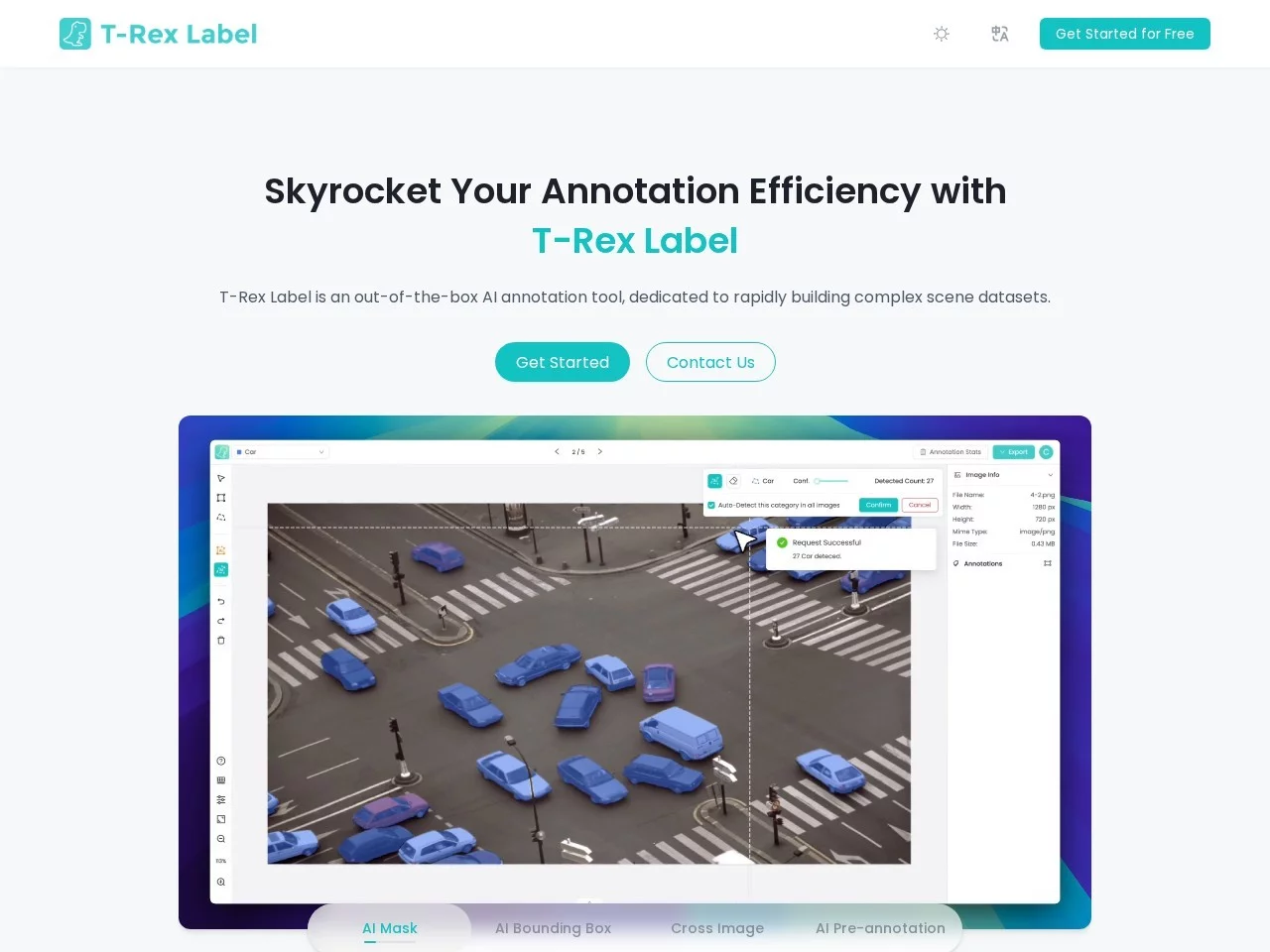
T-Rex Label is an out-of-the-box intelligent annotation tool, focusing on solving annotation problems in dense scenarios, and aiming to improve the efficiency and accurac...


Screenshots

T-Rex Label

Why does data annotation always become a “time sink” in projects?

Most teams that have worked on computer vision projects share a similar experience: the cycle of model selection and network construction is actually controllable, but what really holds up the progress is often the annotation of tens of thousands of images. Engineers can build the architecture in a few days, but annotation may take the team weeks, with labor costs remaining high. T-Rex Label is launched by the IDEA Computer Vision Team, relying on its self-developed T-Rex2 model at the bottom, turning “AI taking over annotation” from a concept into a practical intelligent image annotation tool, allowing teams to say goodbye to “human wave tactics”.

Official website: https://trexlabel.com/

Its efficiency advantage is supported by clear data: compared with the traditional manual individual bounding box selection method, the official figure shows that it can save up to 99% of annotation time. For an image with dozens of densely packed targets, in the past, you had to select and name each one individually; now, AI batch processing makes the gap obvious. More importantly, the threshold for use is extremely low—whether you are a senior algorithm engineer or a new annotation beginner, you can figure out the operation logic and start working in a few minutes.

Technical Foundation Breakdown: The Combination of Visual Prompting and Zero-Shot Detection

The most essential difference between T-Rex Label and traditional tools is that it uses visual prompting to replace individual bounding boxes and cumbersome instructions. Users only need to select a target object as a reference in the image, and the AI will draw inferences from one instance, automatically identify similar targets and complete the annotation of the entire image. For densely packed scenarios such as shelf goods and industrial parts, the value of this mechanism is particularly prominent—it is better to “show the bounding box to the AI” directly than to write prompt words to describe the object laboriously.

Which Steps Does Zero-Shot Capability Eliminate?

Thanks to T-Rex2’s zero-shot object detection capability, when encountering a completely new category of objects that have never been seen before, users do not need to collect a batch of samples for training first, nor fine-tune the pre-trained model, and can directly annotate through visual prompting. This is of great significance for rapidly iterating businesses: when requirements change, the annotation strategy can be adjusted on the same day, without being stuck by the training cycle.

Performance and Output Quality

In terms of the two indicators of object counting speed and accuracy, T-Rex Label outperforms GPT-4 and YOLOv8. In addition to efficiency, it also guarantees the quality of annotation results, and the output data can directly support subsequent model training. The platform also provides custom settings, such as adjusting annotation rules and selecting annotation types, making it convenient for different projects to execute according to their respective specifications.

Practical Path for a Complete Task

The entire process can be completed in the browser, without downloading or installing any client. The specific operations can be divided into four steps:

  1. Login Entry: Open the online tool page and log in with one click using a GitHub account, eliminating the registration process;
  2. Organize Materials: Arrange the images to be annotated and confirm that the format meets the requirements; common formats such as JPEG and PNG are all supported;
  3. Batch Import: Upload multiple images at once via the import button; after import, you can preview or adjust the display order;
  4. Annotation and Proofreading: Select the target object to trigger automatic AI annotation; for positions where individual results are unsatisfactory, you can manually correct or supplement them.

The entire process from login to obtaining results is completed online, so the team does not need to bear deployment and maintenance costs for the tool itself. After annotation is completed, the data can be exported in two mainstream dataset formats: COCO or YOLO, and the connection will be smooth no matter what framework is used for downstream training.

Typical Application Scenarios for Five Types of Teams

Almost all industries involving large-scale image object recognition can find a use for it. By referring to the list below, you can quickly determine whether it meets your needs:

  • Industrial Quality Inspection: Defect detection and flaw detection on production lines, as well as tasks such as building materials counting and parts counting, can directly serve the quality control link;
  • Electronic Manufacturing: The identification and counting of high-density components is the area where this tool excels in handling dense targets, which is exactly the typical problem of the electronics industry;
  • Medical Imaging: Structured annotation of medical imaging data provides a reliable data basis for doctors’ accurate diagnosis;
  • Agricultural Monitoring: Monitoring annotation work during crop growth helps significantly speed up agricultural data processing;
  • Retail and Logistics: Commodity classification, inventory management, and image data requirements in transportation and logistics links can all be quickly covered.

The common points of these scenarios are a large number of targets, strong repetitiveness, and time-consuming and labor-intensive manual annotation—exactly where automated annotation can exert the most value.

Things to Clarify Before Getting Started

Do You Need to Pay?

T-Rex Label is completely free to use; individual users and research teams can get started directly, with no additional licensing fees.

Are There Requirements for Image Formats?

It supports multiple common formats such as JPEG and PNG; most materials accumulated in daily projects can be directly imported, and it can also handle image processing needs for various complex scenarios.

How to Integrate Annotated Data into the Training Pipeline?

The export process supports two mainstream formats: COCO and YOLO, which can be recognized by mainstream deep learning frameworks. After obtaining the data, you can directly integrate it into the existing training process without additional conversion steps.

Compressing weeks of annotation work into a very short time while maintaining data quality—this is exactly the change that T-Rex Label brings to computer vision teams. Teams troubled by annotation progress may wish to experience it themselves.

Relevant Navigation

No comments

You must be logged in to leave a comment!
Login immediately
none
No comments...