AD Recommendation
Join Now
Important: Please do not trust the content and ads of various websites easily! Recommended reading: Safety Tips
Chronicle
Scan to visit on your phone
4wks agoupdate 534 00
0

ChronicleChronicle

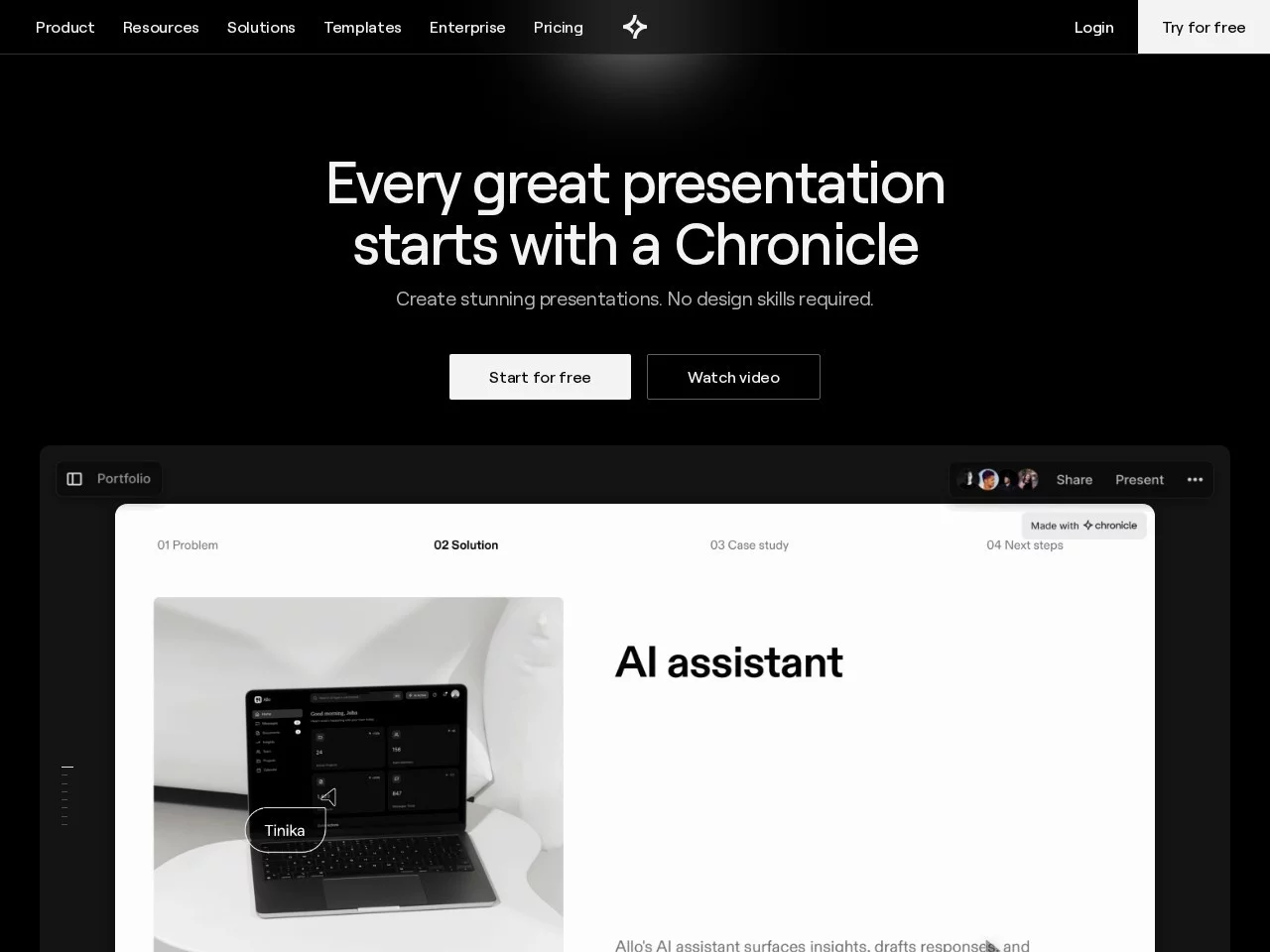
An AI-powered presentation creation tool designed to help users quickly generate high-quality presentations


Screenshots

Chronicle

What is Chronicle? Let AI structure your presentations

Chronicle is an AI-powered presentation creation tool with a simple core concept: you just input a topic or keywords, and AI will automatically generate the content and layout of your presentation, saving you the time of formatting and structuring from scratch. For people who often need to make reports or write proposals, this tool solves the classic problem of “having an idea but not knowing where to start”.

Unlike traditional PPT software, Chronicle is designed from interface to interaction around “quickly creating high-quality presentations”, with intuitive operation and clear structure. The product is currently in the Beta testing phase; users who want to experience it need to fill out a questionnaire and join the waitlist. Here is its official entry:

Official website: https://chroniclehq.com/

Two Core Features: Bento UI Design and AI Auto-Generation

Bento UI: Content Organised Like a Bento Box

Chronicle uses the Bento UI design style. The name comes from Japanese bento boxes — where different dishes are placed in separate compartments, keeping them distinct and easy to see. Translated to presentations, this means dividing content like titles, text, and charts into clear blocks, making information more organised and giving the page a modern look.

This design has two-way benefits: it enhances the visual appeal of the presentation itself, while allowing creators to focus on content delivery instead of worrying about “where to place this element”. The interface is clean and well-structured, so even beginners can get started quickly.

AI Auto-Generation: Input a Topic, Get Content and Layout in One Step

In terms of functionality, Chronicle’s highlight is AI-driven auto-generation. Users input a topic or keywords, and AI will generate the content and layout of the presentation based on that, compressing the most time-consuming setup process into a single step, greatly improving creation efficiency. For time-pressured workplace scenarios — like submitting a project report at short notice — this “give a topic and get a draft” approach is particularly practical.

Who Is This Tool For?

Based on its functional positioning, the following groups of users may benefit significantly from Chronicle:

  • Workplace Presenters: Need to create weekly reports, monthly summaries, and project reports frequently, and want to spend time on content rather than formatting;
  • Entrepreneurs and Sales Professionals: Often need to quickly produce product introductions and business plans, and require both good-looking presentations and fast turnaround;
  • Designers and Content Creators: Prefer clean visual styles like Bento UI and want their work to have a sense of design;
  • Students and Educators: For course presentations, thesis defence materials, etc., need well-structured pages with clear key points.

In addition, Chronicle supports cross-device adaptability, providing a consistent experience across different devices. This means whether you are creating on a computer or viewing on another device, the page will remain stable, with no need to worry about formatting issues.

How to Participate in the Beta Testing?

Since the product has not yet fully launched all features, experiencing Chronicle currently requires a simple process:

  1. Visit the official website: Go to chroniclehq.com to learn about the latest product updates;
  2. Fill out the questionnaire: Submit the questionnaire as required to help the team understand your usage needs;
  3. Join the waitlist: After completing the first two steps, enter the queue and wait for access to the experience.

Although there is an extra waiting step, the Beta phase is often the period when users interact most closely with the product — feedback from early users directly affects the direction of feature refinement. If you are interested in AI presentations, joining the waitlist early is a cost-effective choice.

Quick FAQ

Is Chronicle Free? Can I Use It Directly Now?

According to currently public information, Chronicle is in the Beta testing phase, with features not fully open yet. You need to fill out the questionnaire and join the waitlist to experience it. The specific pricing model will be subject to future announcements on the official website.

What’s the Difference Between It and Traditional Presentation Software?

The biggest difference lies in the generation method: traditional software is mainly manual editing, while Chronicle lets AI automatically generate content and layout based on a topic or keywords, providing a higher starting point and faster speed. Additionally, its Bento UI style also differs significantly from traditional templates in visual presentation.

Is It Worth Waiting in the Queue?

Based on available information, its AI auto-generation capability and clean design style have already attracted a lot of user attention. As the product launches officially and features continue to improve, Chronicle is expected to carve out a place in the presentation creation field. Users with a strong need for fast turnaround can stay tuned and join the waitlist early to experience the product’s iterative updates as soon as possible.

Relevant Navigation

No comments

You must be logged in to leave a comment!
Login immediately
none
No comments...