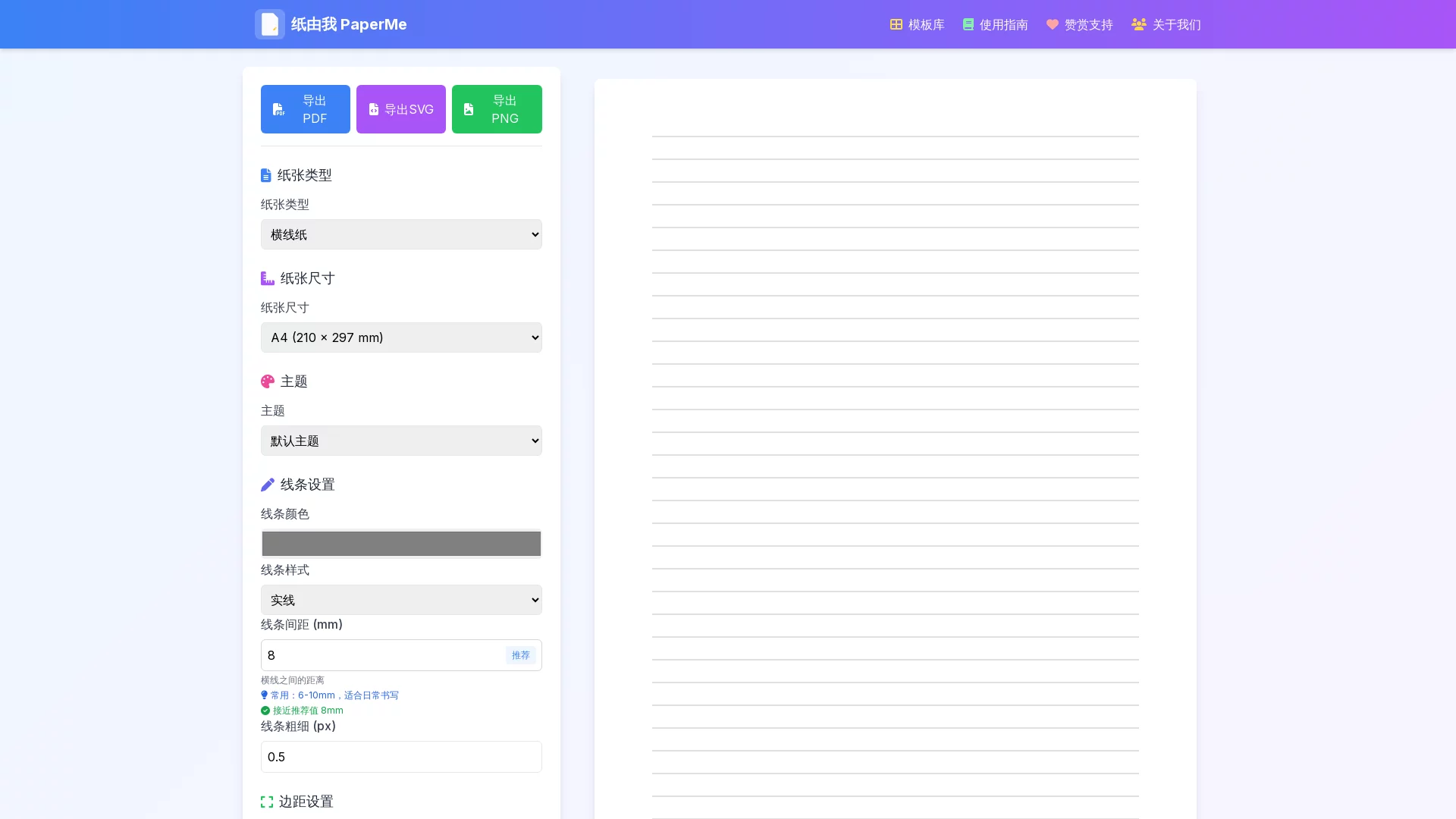
PaperMeFree online creation and printing of custom paper. Design various types such as lined paper, grid paper, dot grid paper, music paper, adjust size, color and spacing to me...
Screenshots

Notebook inner pages never quite suit you? This free tool lets you “make paper” yourself
The inner pages of the notebook you bought have fixed formats and line spacing that don’t feel right, making it awkward to use; you want to find a stack of satisfying dot grid paper for hand drawing practice, but you’ve visited several stationery stores and none have it. Actually, change your mind: these problems can be solved with a printer and a web page — PaperMe is an online custom paper generator, where common inner pages like lined paper, grid paper, dot grid paper can be freely designed in the browser, generated as PDF and printed immediately, completely free of charge.
Official website: https://paperme.toolooz.com/
No registration or login is required to open the website, and there is no limit on usage times. It can be accessed normally on mobile phones, tablets, and computers. Adjust parameters on your mobile phone during commute, print directly when you get home, and the design draft can be called at any time — the whole process is smooth and efficient.
It’s not just the style that can be adjusted: everything from line type to watermark is up to you
Many people’s impression of printing paper is still limited to choosing between “lined or grid”, but PaperMe opens all detail values to users. You can freely combine in the following dimensions:
- Paper type: Multiple basic styles such as lined paper, grid paper, dot grid paper, covering the main needs of writing, drawing, and bullet journals;
- Paper size: Adjust specifications according to actual needs, whether it is regular printing paper or special sizes, it can be accurately matched;
- Line color and style: Light gray, light blue, warm brown can be changed as you like, and line thickness can also be fine-tuned, making the printed paper soft and eye-friendly;
- Custom watermark: Add your name, team logo or a favorite slogan, and the inner page will immediately have a sense of exclusivity.
Real-time preview, what you see is what you get
While adjusting parameters, the page will synchronously present the layout effect, with line spacing and color depth clear at a glance, so you don’t have to worry about finding the format wrong after printing. Once satisfied, click to export a high-quality PDF file, download it locally and print repeatedly, or save it as a fixed template for long-term use.
Templates can be saved, one design for long-term reuse
After adjusting to a satisfactory layout, it is recommended to save and export it as a custom template. Next time you need to add inner pages, apply it directly without adjusting from scratch, which is especially suitable for users with a fixed note system or long-term project planning.
Who is most suitable for using it? Three types of people have their own uses
Students and exam takers: inner pages follow the learning stage
Different subjects have very different requirements for note paper — memorizing words requires column layout, organizing wrong questions prefers large blank spaces, and practice drafts need dense dot grids. Designing your own inner pages means that the note format can be switched at any time, and study diaries and review plans can be customized according to personal habits.
Office workers and project managers: one page to clarify ideas
When making project schedules, meeting minutes, or daily plans, the fixed format of commercially available notebooks is often not flexible enough. Use PaperMe to generate work inner pages with partitions and custom watermarks, print and bind them into a book, which is both professional and easy for the team to recognize.
Painting and calligraphy enthusiasts: practice paper available anytime
Practicing calligraphy requires inner pages with specific grid sizes like palace grids and rice grids, and hand drawing sketches can’t be done without dot grid paper with appropriate density. Set your own spacing and line color, print with light tones that don’t overshadow the content, and the cost of practicing paper is much lower than buying finished products.
Three steps to get started, plus printing tips for better results
The whole operation has no threshold, and beginners can master it by following once:
- Choose type: Enter the website and select basic styles such as lined paper, grid paper or dot grid paper;
- Adjust details: Set paper size, line color and style, add watermark as needed, and view real-time preview while adjusting;
- Export and print: Generate PDF, download it locally, and connect to a printer to output.
Printing tip: To make the finished product close to print quality, it is recommended to use paper with higher grammage and smooth surface, and ensure that the color ink is sufficient, which will significantly improve the layering of lines.
Common questions quick Q&A
Is it paid or do I need to download software? No, PaperMe is completely free, open in the web page and ready to use, no need to install any client.
Can the design be used after switching devices? Yes. The platform supports access on mobile phones, tablets and computers, and the saved and exported custom templates can be called on any device.
What is the quality of the exported file? One-click generation of high-quality PDF, with clear and sharp lines, which is sufficient for both home printers and print shop outputs.
From the wrong question book in student days, to the project planning page in the office, to the calligraphy practice paper on the desk, the style of a single paper seems trivial, but it really affects the daily writing experience. PaperMe returns this small decision to you — design whatever inner pages you want by yourself.
Relevant Navigation

QQ One-Click Group Join Generator
PayQrcode

LaTeX Editor

Erweicaihong
Mobanma