AD Recommendation
Join Now
Important: Please do not trust the content and ads of various websites easily! Recommended reading: Safety Tips
WiFi Connection Card
Scan to visit on your phone
4wks agoupdate 774 00
0

WiFi Connection CardWiFi Connection Card

Online creation of QR codes for WiFi scanning links, one-click WiFi connection QR codes


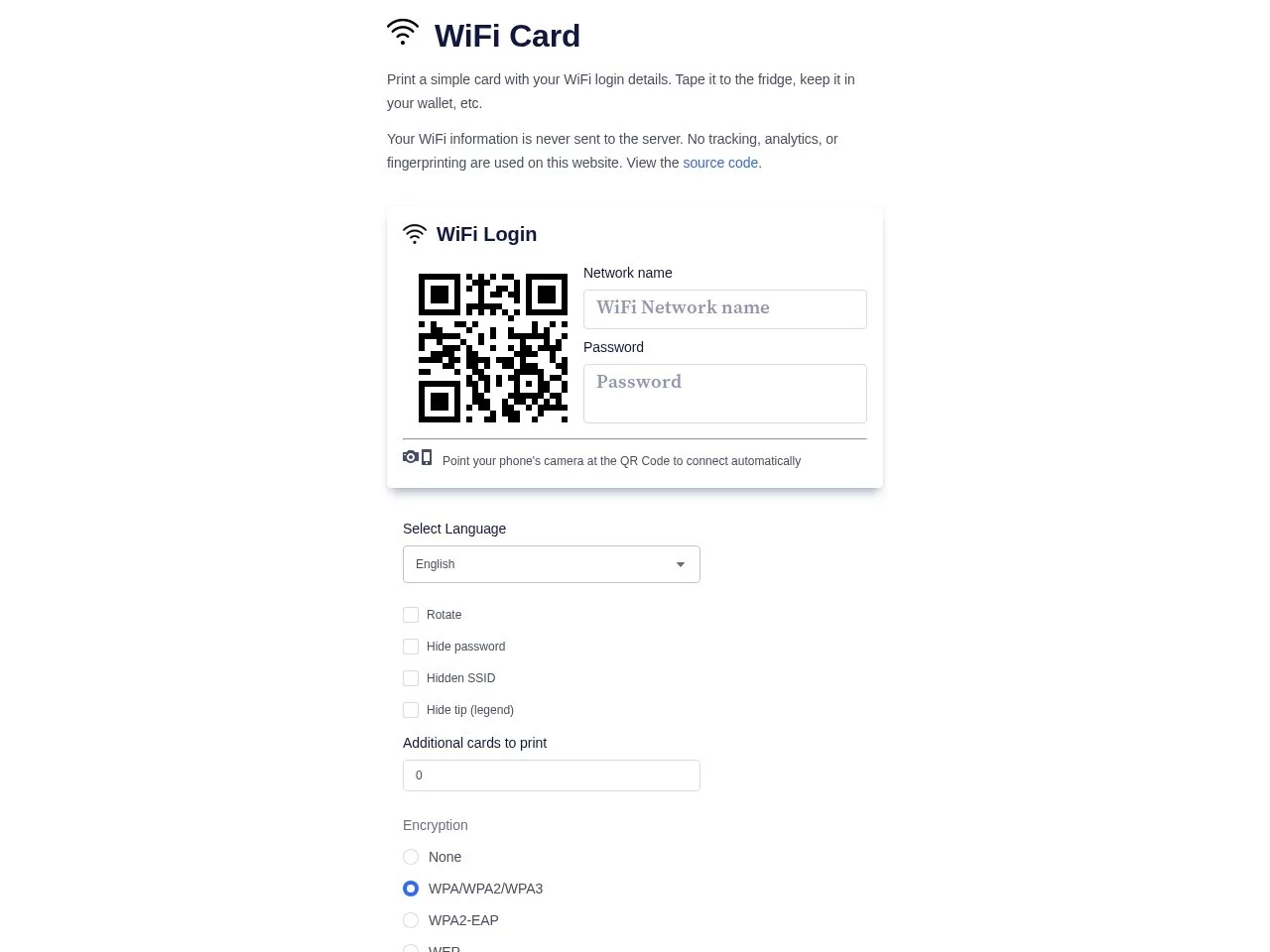
Screenshots

WiFi Connection Card

Guests always ask for the WiFi password? A WiFi Connection Card easily resolves the awkwardness

When guests come to your home, or the shop is full of customers, one of the most common questions is probably “What’s the WiFi password?”. Reciting a long string of letters and numbers verbally may not be clear, and guests often make mistakes when entering it manually. The WiFi Connection Card (wificard) is a tool designed to solve such daily minor troubles: it can integrate the SSID and password of the wireless network into a card printed with a QR code. Guests just need to take out their phone and scan it, no need to enter a single character to complete the connection, saving time and effort.

This open-source small tool has extremely low usage threshold: no need to register an account, nor download a client. Just open the webpage and fill in the information to generate a printable WiFi card. Whether it is pasted on the fridge, pressed under the glass of the office desk, or placed at the hotel front desk, it is a decent and practical approach.

Official website: https://wificard.io/

Get started in minutes: from filling in information to printing the card

The WiFi Connection Card compresses the entire process to the extreme. Even with no technical background, you can do it once by following the steps below:

  1. Visit the official website: Open wificard.io in your browser, and you can start operating after the page loads completely;
  2. Fill in network information: Enter relevant information such as WiFi name (SSID) and password;
  3. Automatically generate QR code: The system will convert the filled content in real time into a card page with a QR code;
  4. Screenshot and print: Save the generated page as a screenshot, output it with a printer, and a dedicated WiFi Connection Card is completed.

For users who care more about data security, wificard also supports local operation via Docker. With the image provided by the project, you can build a service on your own server or home host. The entire card generation process is completed within the local area network, so the information will not leave the network, making it more reassuring to use, and it is also convenient for enterprises to adjust flexibly according to their own needs.

From homes to commercial places, these scenarios are all useful

Don’t underestimate this “paper card”, its practical application range is much wider than imagined:

  • Family gatherings: Paste the card on the fridge or entrance, and relatives and friends can connect to the network by scanning the code when they visit;
  • Office visitors: Prepare a visitor network card for temporary visiting partners, avoiding verbal disclosure of the main network password;
  • Hotels and homestays: Place the card in the room, guests can connect by scanning the code, and the front desk does not need to answer the same question repeatedly;
  • Public places such as cafes and libraries: Place table signs or post on walls, the improvement of customer experience is immediate;
  • Schools and training institutions: Provide clear network access guidance for students and parents, especially convenient at the start of the school season.

For merchants, this is not only convenience, but also a reflection of service details. Compared with verbally reporting passwords or handwritten notes, a QR code card with clear layout is obviously more professional and easier to leave a good impression on customers; for individual users, it saves the repeated work of “having to report the password every time someone comes”.

Privacy protection and open-source transparency are the confidence that makes it trustworthy

WiFi password is sensitive information, many people will worry “Is it safe to fill the password into the webpage?”. wificard gives a clear attitude in this regard: No user data tracking. The WiFi information filled by users is only used to generate the QR code for authorized connection, and will not be collected or used for other purposes. Combined with the Docker self-hosting solution mentioned earlier, users with high privacy requirements can almost achieve zero information leakage.

Secondly, wificard is a fully open-source project, the code is hosted on GitHub (https://github.com/bndw/wifi-card), and anyone can view and review its implementation logic. Open source means transparency — no hidden statistical scripts, no paywalls, and the community is also continuously maintaining it. If you have customization needs, such as adjusting the card style to match the store’s style, you can completely modify it based on the source code, which is the freedom that closed-source tools cannot provide.

“No need to remember complex passwords” is the original design intention of wificard — simplify the connection process to a single scan with a QR code, and let network sharing return to the most natural way.

Before making and using, clarify these common questions

Does the generated card depend on third-party services?

When generating the QR code, you need to access the official website or local Docker service, but the printed card is just an ordinary piece of paper. Guests scan the code to connect to your home or store’s own wireless network, and the daily use stage does not depend on any online services.

What if the mobile phone can’t scan it?

Major iOS and Android systems support identifying WiFi QR codes and connecting with one click via the camera, with a very wide coverage. If individual old devices cannot identify it, the network name will still be displayed on the card, and manually entering the password once can solve the problem.

Do you need to remake it after changing the WiFi password?

Yes. After the password is modified, the old card will become invalid. Just re-visit the official website, fill in the new information, and print a new card to replace it. The whole process still only takes a few minutes, and the cost is almost negligible.

Relevant Navigation

No comments

You must be logged in to leave a comment!
Login immediately
none
No comments...