AD Recommendation
Join Now
Important: Please do not trust the content and ads of various websites easily! Recommended reading: Safety Tips
Removebg
Scan to visit on your phone
3wks agoupdate 691 00
0

RemovebgRemovebg

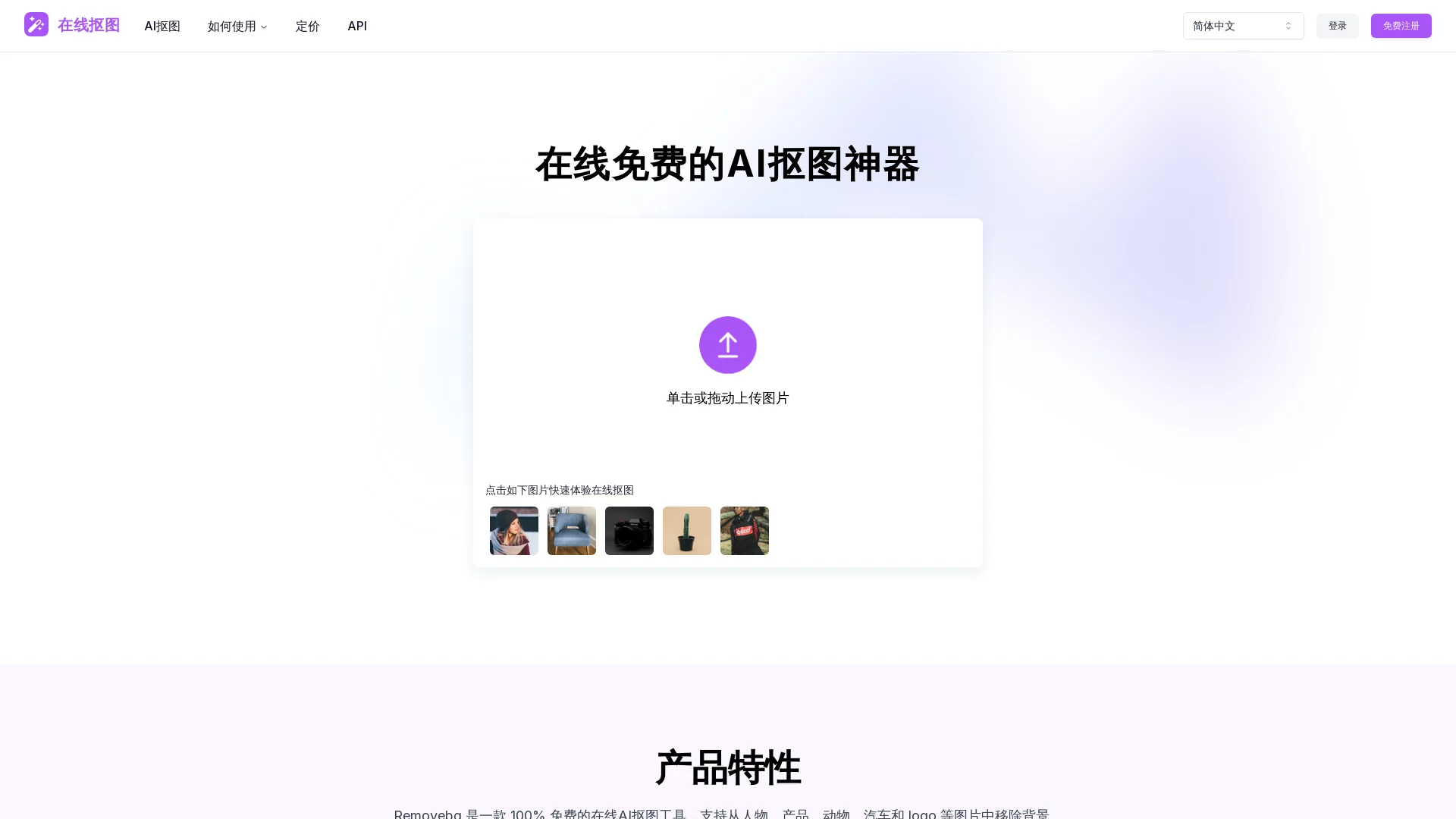
Removebg.one is a completely free online AI background removal tool that supports removing backgrounds from images, suitable for various scenarios and needs.


Screenshots

Removebg

Have you ever encountered trouble with background removal? For example, e-commerce sellers need to create white background images for products, but when using tools to cut out images themselves, the results are uneven—either with residual background marks or fuzzy edges around the subject; or when posting on social media, you want to change the background of a photo to a clean one, but can’t find a convenient free tool.

When choosing an online background removal tool, ask yourself three questions first

Many people, when choosing a background removal tool, only focus on “free” and “fast”, but ignore their actual needs. In fact, you can start by asking yourself three small questions: Are you removing a person, a product, or an animal? Do you just need to simply remove the background, or do you need to manually adjust details? Do you only use it occasionally, or do you need to integrate it into your workflow?

Different answers correspond to different tool choices. For example, some tools are only suitable for removing people, and cannot handle complex details like animal fur well; some tools can only process small images, and will become blurry when dealing with high-resolution product images used in e-commerce; some tools require registration and login, or only support a single language, which is not user-friendly for developers who need integration.

Official website: https://removebg.one/zh-CN

What makes RemoveOne different from similar tools?

Background removal accuracy and speed: which scenarios can it cover?

Many free online background removal tools are either slow, requiring a dozen seconds or even longer, or have poor accuracy—resulting in blurry edges of the cut-out image, or even removing the subject’s hair strands along with the background. RemoveOne is different: after uploading an image, it produces results in a few seconds, and can handle common objects like people, products, animals, cars, and logos quite cleanly—even details like fur can retain their outline roughly.

It also supports a wide range of scenarios: e-commerce product photography for white background images, graphic design for material images, social media for profile pictures or posts, photo editing for photography, and even marketing ad images. Of course, it has limitations: if you need professional-level high-precision background removal, such as cutting out the translucent tulle of a wedding dress, you may need to find a more professional tool.

Operation and integration: can it meet your usage habits?

Some tools are troublesome to use: you need to register an account, log in, pay to export high-definition images, or only support specific image formats. RemoveOne does not require registration or login—you can operate it directly in the browser, supporting common formats like JPEG, PNG, JPG, and can handle high-resolution images up to 40.96 million pixels, which is just enough for e-commerce product images.

If you are a developer who needs to integrate background removal functionality into your own website or app, RemoveOne can also meet your needs: it supports multiple programming languages and frameworks, and you only need to call a simple API—no need to spend time developing background removal functionality yourself, which saves a lot of effort. If you are just an ordinary user who uses it once or twice occasionally, you don’t need to care about these integration functions—just upload and export directly.

Manual adjustment and output: is it flexible enough?

Some tools cannot be modified after background removal—if you accidentally remove part of the subject, you have to re-upload the image. RemoveOne provides the opportunity for secondary editing: you can manually adjust the background removal effect, such as restoring accidentally removed details, or changing the pixel background to a solid color or other simple background—no need to find another tool for image editing.

There are also many output options: in addition to common image files, it also supports JSON encoding, which is suitable for users who need to import background removal data into other programs. However, does its free version have export restrictions? Currently, according to the tool’s description, no such restrictions are mentioned, and it is sufficient for most general purposes.

Who is suitable for using RemoveOne, and who should choose another tool?

If you are an e-commerce practitioner who needs to create product images; or a content operator or ordinary user who occasionally creates posts for social media; or even a photographer who needs to process photos quickly—RemoveOne can be used in all these cases. It is easy to operate and does not require much time to learn.

If you need high-precision background removal, such as a professional designer creating a poster and needing to cut out complex translucent objects; or an enterprise user who needs to batch process a large number of images—you may need to look for a tool more suitable for batch operations. However, for most ordinary users, small and medium-sized e-commerce businesses, and content creators, RemoveOne’s functions are already sufficient—no need to spend extra money on professional tools.

  • Situations suitable for using RemoveOne: occasional or small-scale background removal, need for quick results, no desire to register or log in, need to process common objects
  • Situations not suitable for using RemoveOne: need for professional-level high-precision background removal, need to batch process a large number of images, need for complex manual image editing operations

Relevant Navigation

No comments

You must be logged in to leave a comment!
Login immediately
none
No comments...