AD Recommendation
Join Now
Important: Please do not trust the content and ads of various websites easily! Recommended reading: Safety Tips
FREE TinyPNG
Scan to visit on your phone
4wks agoupdate 637 00
0

FREE TinyPNGFREE TinyPNG

A completely free online image compression tool that supports WebP, PNG, and JPEG formats


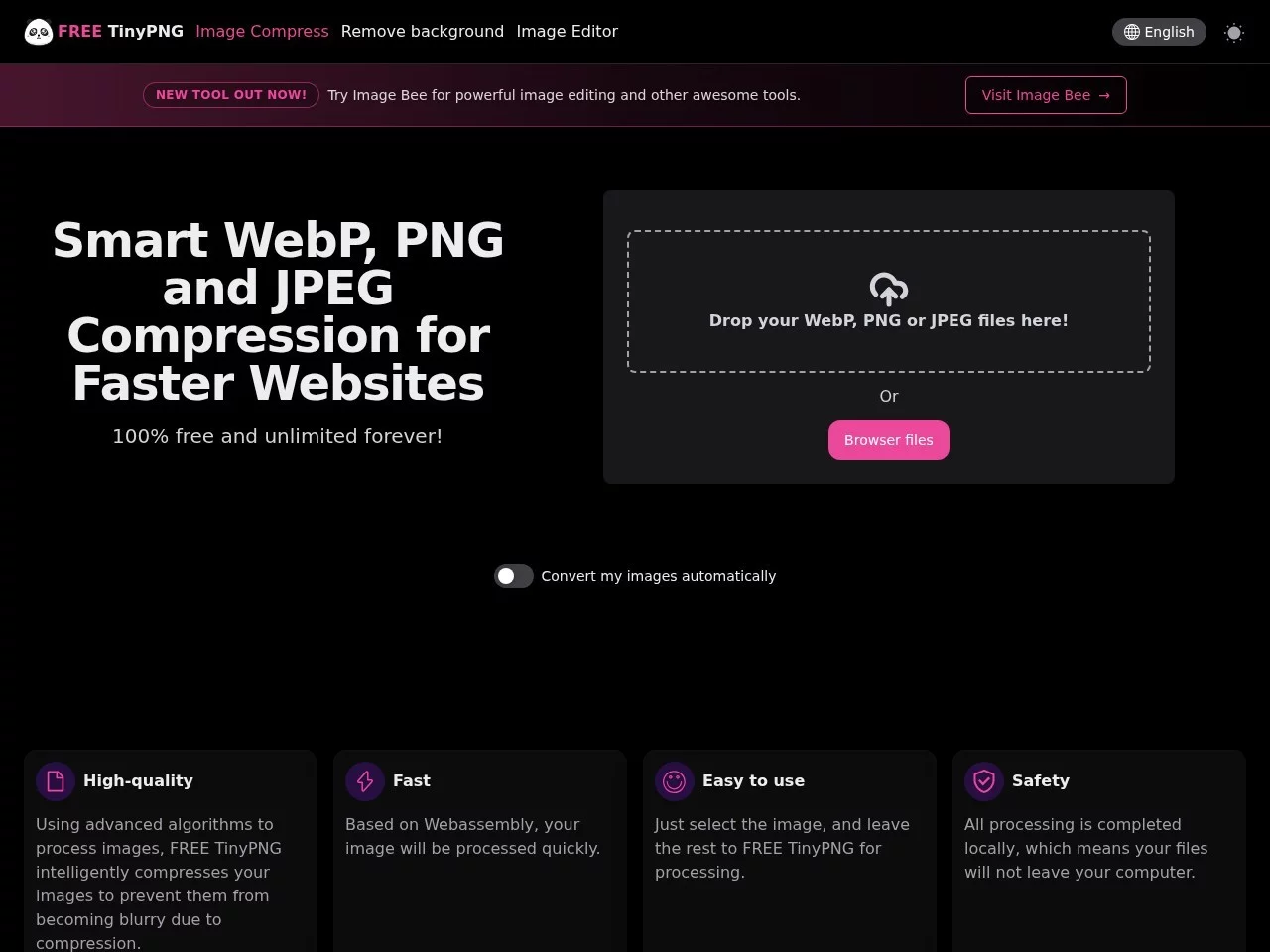
Screenshots

FREE TinyPNG

Images holding you back due to their size? FREE TinyPNG, the free online compression tool, solves your troubles

Slow web page loading, full phone photo albums taking up memory, repeated timeouts when uploading attachments — these small daily hassles in work and life are mostly related to overly bulky image files. If you want to optimise images without installing professional software or paying for a membership, FREE TinyPNG, this free online image compression tool, is the perfect choice. It supports three mainstream image formats: WebP, PNG, and JPEG. Using an intelligent compression algorithm to optimise images, it significantly reduces file size while maintaining high-quality visual effects. The entire process can be completed in the browser, with no need to install any client at all.

Official website: https://free.tinypng.site/

Four core advantages for an efficient and secure compression experience

There are many image compression tools on the market, but not many that balance image quality, speed, privacy security, and being free. FREE TinyPNG performs well in these core areas and fully meets the needs of different users.

  • Almost lossless quality: Processed using an advanced, optimised compression algorithm, the compressed images show almost no visible difference from the original. It significantly reduces file size while preserving image display quality, with no issues like blurriness or colour blocks that would affect use.
  • High batch processing efficiency: Supports uploading multiple images at once. After unified compression, an integrated download link is generated, eliminating the need for repeated downloads of each image individually. It is especially suitable for users like designers and e-commerce operators who need to process large numbers of images in bulk.
  • Local processing for peace of mind: Uses Webassembly technology to process images locally on the user’s device. Image data is not uploaded to third-party servers, effectively ensuring file security and privacy, so there is no need to worry about sensitive images being leaked.
  • Free with no usage limits: The tool has no usage barriers or compression count limits. It works on all internet-connected devices and operating systems, and is always useful for tasks like website optimisation, saving storage space, or quickly sharing images.

Three simple steps for image compression, even for beginners

Many people worry that complex tool operations will increase usage costs, but FREE TinyPNG is designed to fit the habits of ordinary users. Even beginners who are trying image compression for the first time can easily get started and complete the operation.

  1. Visit the official website: Open the FREE TinyPNG official site. The page supports multiple languages including Chinese, has a clean and simple interface with no unnecessary ads or complex parameter settings, so you can easily find the upload entry at a glance.
  2. Drag and drop to upload images: Drag the images you want to compress directly into the designated area on the page. The system will automatically recognise and start compression. Multiple images can be added at once, no need to do it in batches.
  3. Download the compressed result: After compression is complete, the page will automatically provide a download link. Click to save the compressed image. The entire process requires no account registration or adjusting any complex parameters — from upload to getting the result, it’s a seamless process.

This extremely simple operation process is especially suitable for daily scenarios where you need to quickly process scattered images, such as organising your phone photo album, preparing images for social media, or sending large images to friends. You don’t need to spend time learning complex functions to efficiently reduce image size.

Advanced features for diverse needs, covering professional use cases

In addition to the basic web-based compression function, FREE TinyPNG also provides advanced solutions for users with higher needs, meeting the diverse use cases of professional developers and website operators.

API interface for automated compression

The tool offers an open API interface, supporting batch processing and custom parameter adjustment. Developers can call the interface via Python scripts or other methods, embedding the image compression step into their own workflow to achieve automated bulk optimisation of image resources, eliminating the hassle of manual operations and improving work efficiency.

WordPress plugin direct connection to website backend

If you run a WordPress website, you can also use the official WordPress plugin to compress images in the media library directly in the website backend. This allows you to optimise image sizes conveniently when uploading images or updating articles, which helps improve website loading speed and visitor browsing experience.

Frequently Asked Questions (FAQs) to address concerns

Will the image quality drop significantly after compression?

There will be no noticeable loss in image quality. FREE TinyPNG uses an optimised image compression algorithm to reduce file size while ensuring the visual effect of the image is almost identical to the original, fully meeting various needs like daily web images and social sharing.

Is there a fee or usage limit?

The web-based functions are completely free with no usage limits, available to all users. If you need higher compression rates or bulk automated processing, you can use the API interface. For related fees and rules, please check the official channels for details.

Will the uploaded images be leaked?

The tool uses Webassembly technology to process images locally, so image data is not uploaded to third-party servers. File security and privacy are effectively guaranteed, so there is no need to worry excessively about image leaks.

Relevant Navigation

No comments

You must be logged in to leave a comment!
Login immediately
none
No comments...