AD Recommendation
Join Now
Important: Please do not trust the content and ads of various websites easily! Recommended reading: Safety Tips
fffuel
Scan to visit on your phone
4wks agoupdate 743 00
0

fffuelfffuel

Free online SVG graphics generation toolbox


Screenshots

fffuel

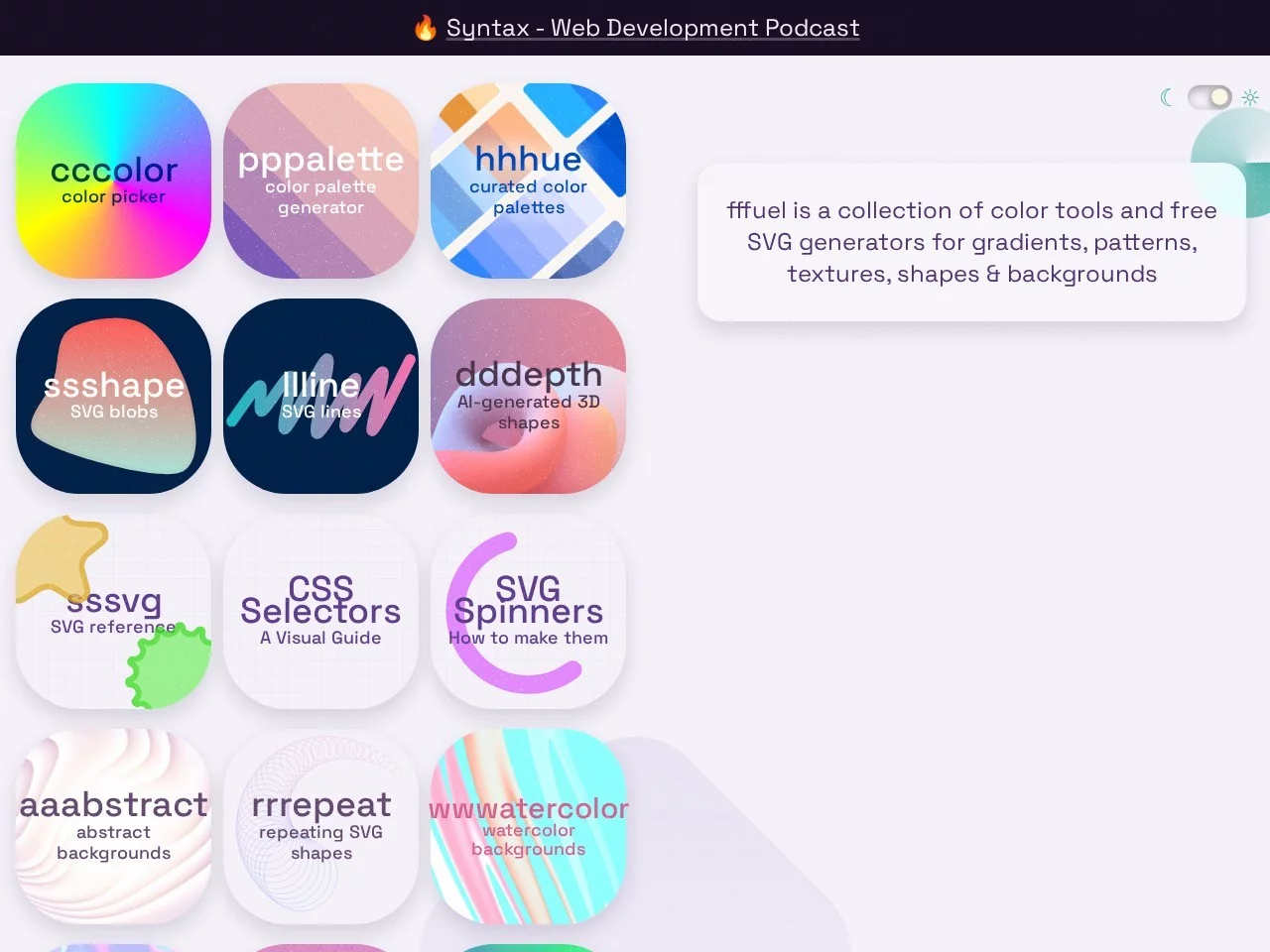
fffuel: A Free SVG Graphics Creation Toolbox Built for Designers

Official Website: https://www.fffuel.co/

In design work, many people have faced this dilemma: you want to create a unique background but can’t find suitable assets, professional software is too complicated to operate, and images found on the fly often come with copyright issues. fffuel emerged precisely to solve these pain points. It is an online toolbox focused on free SVG graphics generation, integrating colour matching, effects creation and many other practical functions in one place. Whether you are a professional designer or an office worker who needs to produce assets quickly, you can bring your creative ideas to life with zero barriers.

As a design tool that prioritises lightness, fffuel’s core advantage lies not in piling up features, but in the fact that every tool precisely meets real creative needs while remaining extremely easy to use. No software to download, no complicated workflows — just open the web page and start using it. This is also a key reason why it has become an essential tool for designers’ daily creative work.

A Breakdown of fffuel’s Core Features: SVG Creation Support for Every Scenario

Many people assume online design tools are limited in functionality, but fffuel breaks this stereotype. Its feature modules cover almost all high-frequency needs of everyday design, from basic colour matching to complex graphic effects, each polished for practical use. Let’s take a closer look at its core features:

  • Fluid gradient generator: This is a common asset for web UI and e-commerce posters. fffuel’s fluid gradient tool generates dynamic, smooth gradient backgrounds in SVG format, and you can adjust the gradient direction and the pace of colour transitions to create layered visual effects without any code, adapting to the display needs of various devices.
  • Isometric SVG pattern maker: Isometric-style patterns can quickly add depth to design work. This fffuel tool generates isometric graphics that follow perspective rules directly. You can adjust the size and number of shapes and pair them with different colours to easily create visually striking three-dimensional elements, suitable for product illustrations, PPT chart decorations and more.
  • Texture and shape effects: If you need designs with special textures, tools such as noise texture, polygon generation and shape explosion come in handy. For example, use noise texture for paper grain, polygon generation for decorative borders, and shape explosion effects to add a sense of motion to static graphics. All these tools support SVG export, making later modifications easy.
  • Colour scheme tool: Colour matching is at the heart of design. fffuel’s colour scheme tool provides professional colour combination references. You can choose suitable palettes for different scenarios (such as a website’s primary colour or brand accent colours) and export colour codes with one click, ready to paste into design software, saving the time spent on repeated colour tuning.
  • Direct reuse of SVG assets: Once your creation is complete, fffuel supports one-click downloading of SVG images, or you can copy the code directly to embed it into web pages, PPTs or design software without any format conversion, greatly improving asset reuse efficiency.

Where fffuel Fits: Covering Everything from Professional Design to Everyday Office Work

fffuel’s flexibility allows it to fit almost any scenario that requires visual assets. Whether it is a professional design project or a temporary office need, there is a corresponding solution. For UI designers, decorative elements for web interfaces, icon backgrounds for apps, and transition effects for campaign pages can all be quickly generated with fffuel’s SVG tools. Moreover, SVG assets do not blur when enlarged, making them suitable for devices of different sizes.

For graphic designers, backgrounds for e-commerce promotional posters, decorative graphics for brand materials, and special textures for printed items can all be efficiently completed with fffuel. There is no need to repeatedly adjust parameters in complex design software — high-quality SVG assets can be generated online, and the time saved can be spent on more creative work.

Beyond professional design, fffuel is also a capable assistant for office workers. When making a PPT and wanting a unique cover background, there is no need to search for images online — just open fffuel and use the fluid gradient or isometric pattern tool to create a custom background in minutes. When making department posters or event notices and needing some decorative graphics on the fly, those can be generated quickly too. It requires no software installation — as long as you have an Internet connection, you can use it. For non-professional designers, it is an excellent tool for lowering the barrier to creating visual assets.

fffuel Usage Tips: Small Tricks to Boost Creative Efficiency

When using fffuel for the first time, many people may feel overwhelmed by the number of tools and not know where to start. In fact, mastering a few small tricks will help you find the right features faster. For example, if you do web design, start with the fluid gradient and isometric pattern tools, as these two types of assets are the most commonly used in web design. If you are making a PPT, use the colour scheme tool first to settle the overall colour tone, then add texture effects for detail decoration — the result will be more harmonious.

In addition, all assets from fffuel are free and cleared for commercial use, which is very important for designers working on commercial projects — no need to worry about copyright issues. You can save the generated SVG assets locally or copy the code directly. Whether for personal projects or commercial work, there are no restrictions. This is also one of the reasons it has become an essential tool for designers’ daily creative work.

From professional design to everyday office work, fffuel lowers the barrier to creating visual assets by integrating practical SVG generation tools, allowing more people to bring their ideas to life with ease. No complicated operations, no expensive software fees — just open the official website and start creating. This is the key to why it stands out among the many design tools.

Relevant Navigation

No comments

You must be logged in to leave a comment!
Login immediately
none
No comments...