AD Recommendation
Join Now
Important: Please do not trust the content and ads of various websites easily! Recommended reading: Safety Tips
Huida Font Navigation
Scan to visit on your phone
4wks agoupdate 651 00
0

Huida Font NavigationHuida Font Navigation

Download free fonts for commercial use


Screenshots

Huida Font Navigation

Looking for free commercial-use fonts: should you choose a platform with all licences clearly labelled, or one with mixed labels?

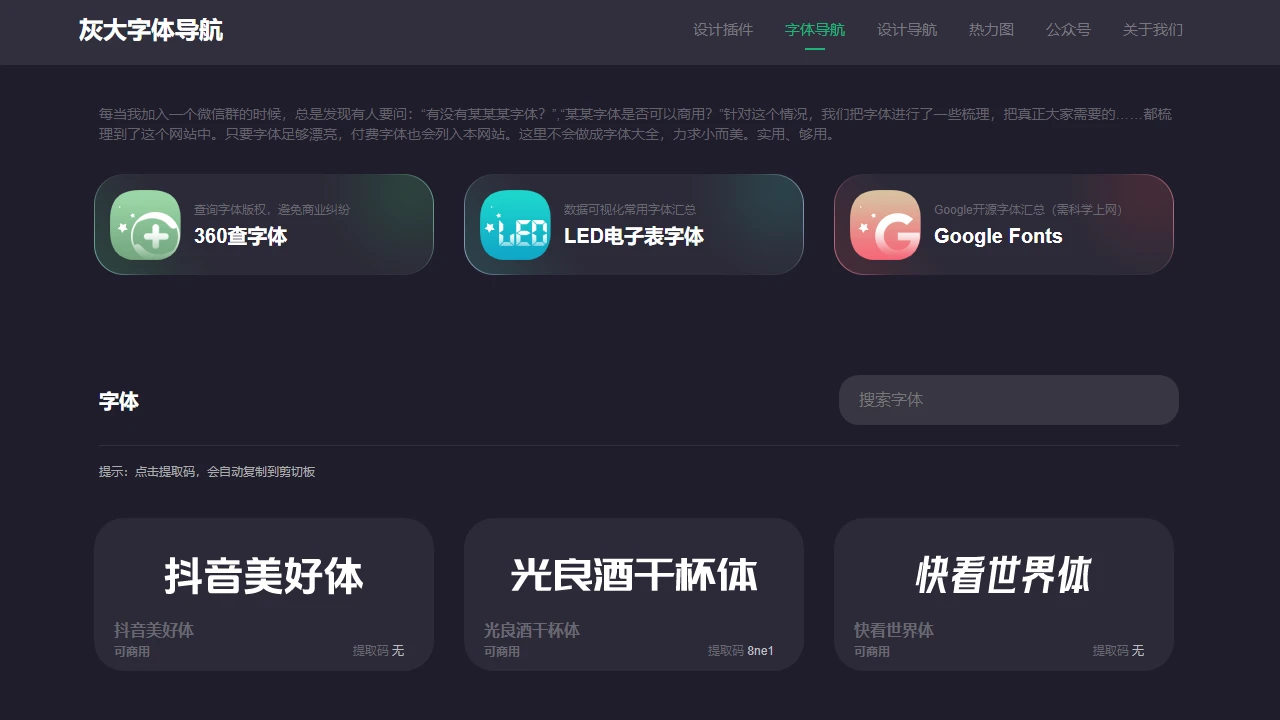
I just took on a poster job for a brick-and-mortar shop and wanted a handwriting-style font. I browsed three websites: some were stuck behind paywalls, while others were labelled “commercial use” but turned out to require signing a licence agreement once you clicked in — most designers have run into this kind of frustration. Huida Font Navigation was built to solve exactly this pain point. Its core mission is to draw a crystal-clear line around “free for commercial use”. To be clear upfront, this is a platform dedicated solely to font navigation, with no flashy extra features. Its official website is: https://www.pslkzs.com/fonts.php

What common pitfalls can Huida Font Navigation help you avoid?

Don’t fall for the “commercial use” wordplay

I hit this trap before while helping a friend design packaging for their WeChat business: a website claimed “free for commercial use”, but when the font was used on a product detail page and a complaint came in, we found out it actually meant “non-profit personal use”. Every font on Huida Font Navigation states its commercial-use rights plainly, with no grey areas, so you won’t suddenly step on a landmine when using fonts in commercial projects.

Besides, its font library isn’t randomly thrown together: it has nearly a thousand commonly used fonts, plus dozens of niche fonts that used to be paid. Styles range from minimalist sans-serif and vintage serif to graffiti handwriting and creative display typefaces, so you won’t end up with just a few dozen repetitive results when searching for “poster fonts”.

How does Huida Font Navigation differ from other font directories?

A comparison of the practical differences

  • Over 3x faster downloads: other platforms make you jump to third-party sites and wait for ads to load, while Huida Font Navigation links directly to cloud drives. Click “Preview” to see how a font looks at sizes 36, 72 and 96, then click “Download” if it fits — no page switching needed. From finding a font to saving it locally takes as little as 10 seconds, saving you at least 2 minutes compared with other sites.
  • Half the filtering effort: some font directories mix free, commercial-use and paid fonts together, so you have to flip through 10 pages to find one that is genuinely free for commercial use. Huida Font Navigation lists these fonts separately — no filter buttons needed, and you can see all compliant fonts on the homepage instead of digging through thousands.
  • No need to check copyright info yourself: on some platforms, the “commercial use” labels are added by users and never verified by the platform, so if problems arise you still have to seek authorisation from the font vendor yourself. All fonts on Huida Font Navigation are verified, with the copyright holders clearly stating the commercial-use rights, so you don’t need to check anything extra — just pick a font and use it.

Who is Huida Font Navigation suitable for?

If you’re a freelance designer taking on small jobs or creating images for your own WeChat Official Account, worried about copyright but unwilling to spend hundreds on font packs, the resources here will be enough for you, with no extra licence registration required. If you work in marketing at an SME making offline posters or product packaging, you won’t need to negotiate complicated copyright contracts with your legal team — just pick fonts here and avoid most compliance risks.

Of course, it isn’t all-powerful. For example, if you’re looking for custom calligraphy fonts or niche fonts licensed only by overseas vendors, they may not be available here. But it covers the font needs of 90% of everyday commercial scenarios, such as posters, product detail pages, brochures and short-video subtitles.

Relevant Navigation

No comments

You must be logged in to leave a comment!
Login immediately
none
No comments...