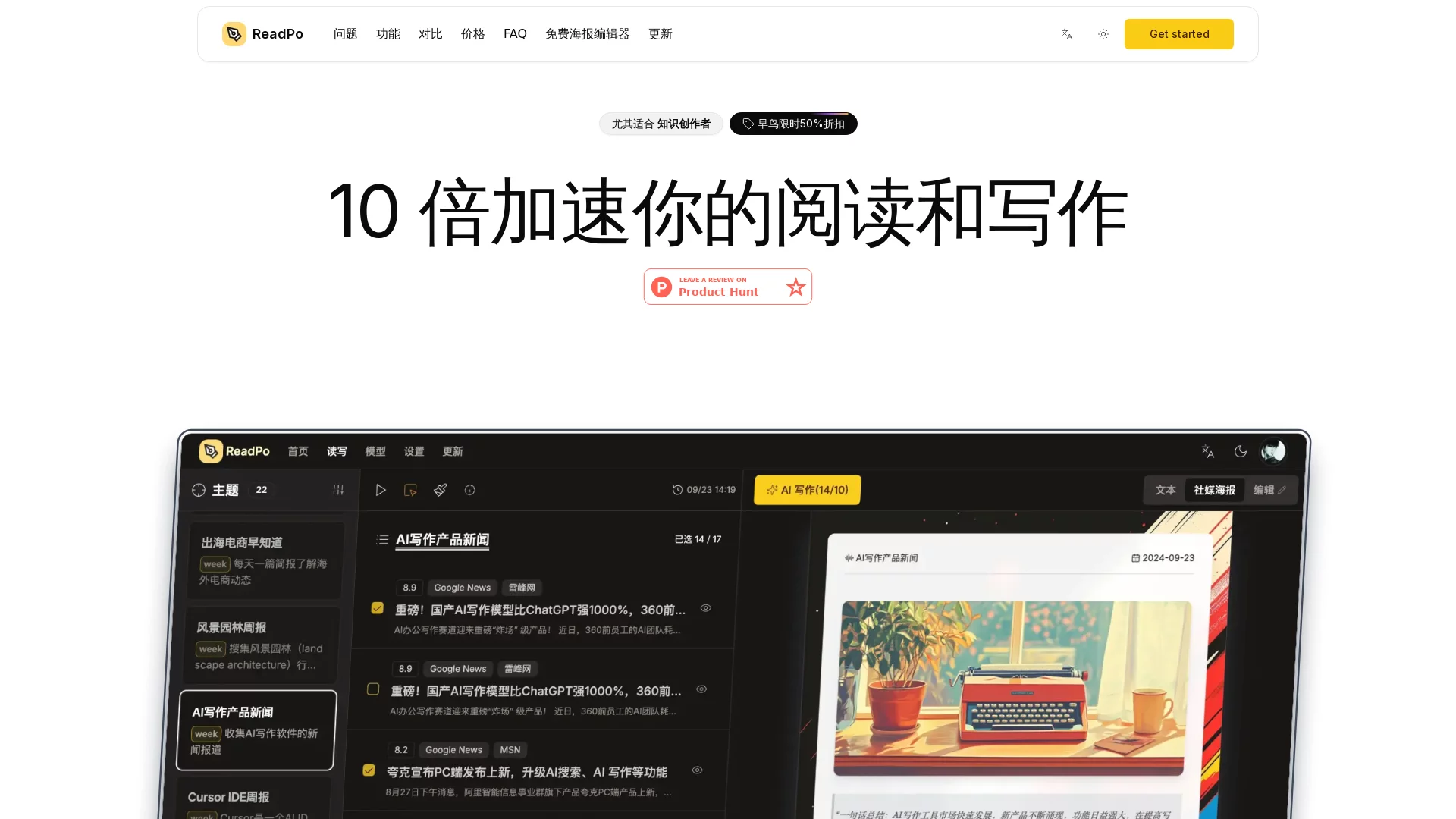
ReadPoReadPo is an AI-powered reading and writing assistant designed for knowledge creators. It aims to help users efficiently collect, screen, create, and publish content by i...
Screenshots

Subscription feeds piling up, bookmarks growing longer, yet documents remain blank — this is the daily grind for many knowledge creators, caught in a loop of “too much to read” and “nothing to write”. ReadPo is an AI reading and writing assistant built specifically to solve this pain point: it integrates content aggregation, intelligent filtering, AI-assisted writing, and multi-format output into a single platform, making the “from reading to writing” workflow coherent for the first time. This article will help you get to know it from a practical usage perspective.
Official Website Access and Account Activation Method
Official website: https://readpo.com/zh
Open the above address in your browser to complete registration. ReadPo currently offers three subscription plans: Free, Starter, and Pro. The Free plan is sufficient to run the basic processes of information aggregation and AI reading/writing. A more reliable approach is to first verify if the Free plan matches your creation rhythm, then consider paying to unlock higher-tier features and quotas.
It is important to note that when registering, be sure to confirm the official domain name and avoid logging in through untrusted third-party links to protect your account and personal data security.
Breaking Down the Reading and Writing Process into Four Stages: What ReadPo Does at Each Stage
Stage 1: Automatic Information Aggregation
Instead of jumping between a dozen apps, let information flow to one place. ReadPo supports automatic collection from multiple channels including Google News, RSS feeds, and Twitter. The content you follow will continuously enter the platform as set, eliminating the time spent searching through each platform individually.
Stage 2: AI for Initial Screening
After information comes in, the most time-consuming part is screening. ReadPo allows users to customize filtering rules, and the system will automatically score and sort content, pushing the most valuable content to the top. The value of this mechanism lies in: the object of your time investment is narrowed from “all information” to “high-score information”, greatly raising the starting point of reading.
Stage 3: Thematic In-depth Reading and Writing Processing
Focusing on reading related content around a specific theme is the thematic reading method advocated by ReadPo — compared to fragmented scrolling, this approach makes it easier to build a systematic understanding of a field. The materials read will immediately enter the writing process: AI provides text summaries, key point extraction, intelligent paragraphing, and key marking, turning original information into writing materials that can be used directly.
Stage 4: Multi-format Publishing from a Single Draft
Output does not have to stop at articles. ReadPo supports generating multiple content forms such as articles, images, videos, and blogs; its built-in Markdown poster editing tool can also convert Markdown content into graphic posters with one click, which can be exported and shared directly on social media. The same set of materials covers multiple distribution channels, eliminating the need to spend time learning layout and design separately.
Batch Summary Writing: Efficiency Leverage for Heavy Information Processors
If you need to digest dozens of pieces of information every day — such as news briefing authors — processing each one individually is almost unsustainable. ReadPo’s batch summary writing function is designed for such high-frequency scenarios: it extracts core viewpoints from each piece of content in a short time, then quickly assembles them into a well-structured briefing. The larger the amount of information processed and the more diverse the sources, the more time this function saves.
Why Generated Content is Reliable: The Role of RAG and Custom Prompts
A common problem with many AI writing tools is “working in a vacuum” — relying entirely on model memory for generation, leading to outdated or even inaccurate content. ReadPo uses RAG (Retrieval-Augmented Generation) technology, which allows articles to be built on real-time, real data, making the output more vivid, up-to-date, and accurate — especially critical for information-based writing that requires timeliness.
At the personalized level, ReadPo offers custom writing prompts and multi-model support: you can customize writing prompts according to your own writing style, and flexibly switch between different models to find the output effect that best fits your personal language sense, avoiding the uniform “AI tone”.
Three Common Questions About ReadPo
Do I have to pay to use it?
No. The Free plan allows you to experience the core process, while the Starter and Pro plans mainly provide higher-tier features and larger quotas. You can upgrade as needed, and there is no threshold that “you can’t get started without paying”.
Who is most suitable for using it?
- WeChat Official Account operators and blog authors: Continuously producing original content, aggregation plus AI writing can significantly reduce the time spent on topic selection and first drafts.
- News briefing authors: Batch summary combined with intelligent screening makes briefing production twice as efficient.
- Researchers and students: Thematic reading plus key point extraction helps quickly sort out the context of literature and materials.
- Office workers: When tracking industry trends and writing reports, AI summaries significantly reduce the burden of information processing.
- General readers: Those who only want to extract the essence from massive information can also use it to complete efficient daily reading.
What’s the difference between it and a regular RSS reader?
Traditional readers stop at “collection and display”, while ReadPo extends the workflow to screening, reading, writing, and publishing — according to official introduction, users can complete daily reading and writing tasks with 10x efficiency. The former is a transfer station for information, while the latter is a production line for content.
Onboarding Tips for New Users
- Configure your information sources correctly first: The more your subscription feeds match the fields you care about, the better the AI screening and scoring performance. This step is worth spending time on.
- Try multiple sets of writing prompts: Find the prompt combination that best matches your writing style, and the output quality will be significantly more stable.
- Don’t only use one output form: You can try different forms such as articles and posters with the same set of materials, and explore the expression methods that best suit your audience.
When collection, screening, reading, writing, and publishing are organically connected by AI, the time creators save is returned to thinking and expression itself.
Relevant Navigation
AI Manga Translator
Weekly Report Generator
Huiwa