AD Recommendation
Join Now
Important: Please do not trust the content and ads of various websites easily! Recommended reading: Safety Tips
zimuFy
Scan to visit on your phone
3wks agoupdate 535 00
0

zimuFyzimuFy

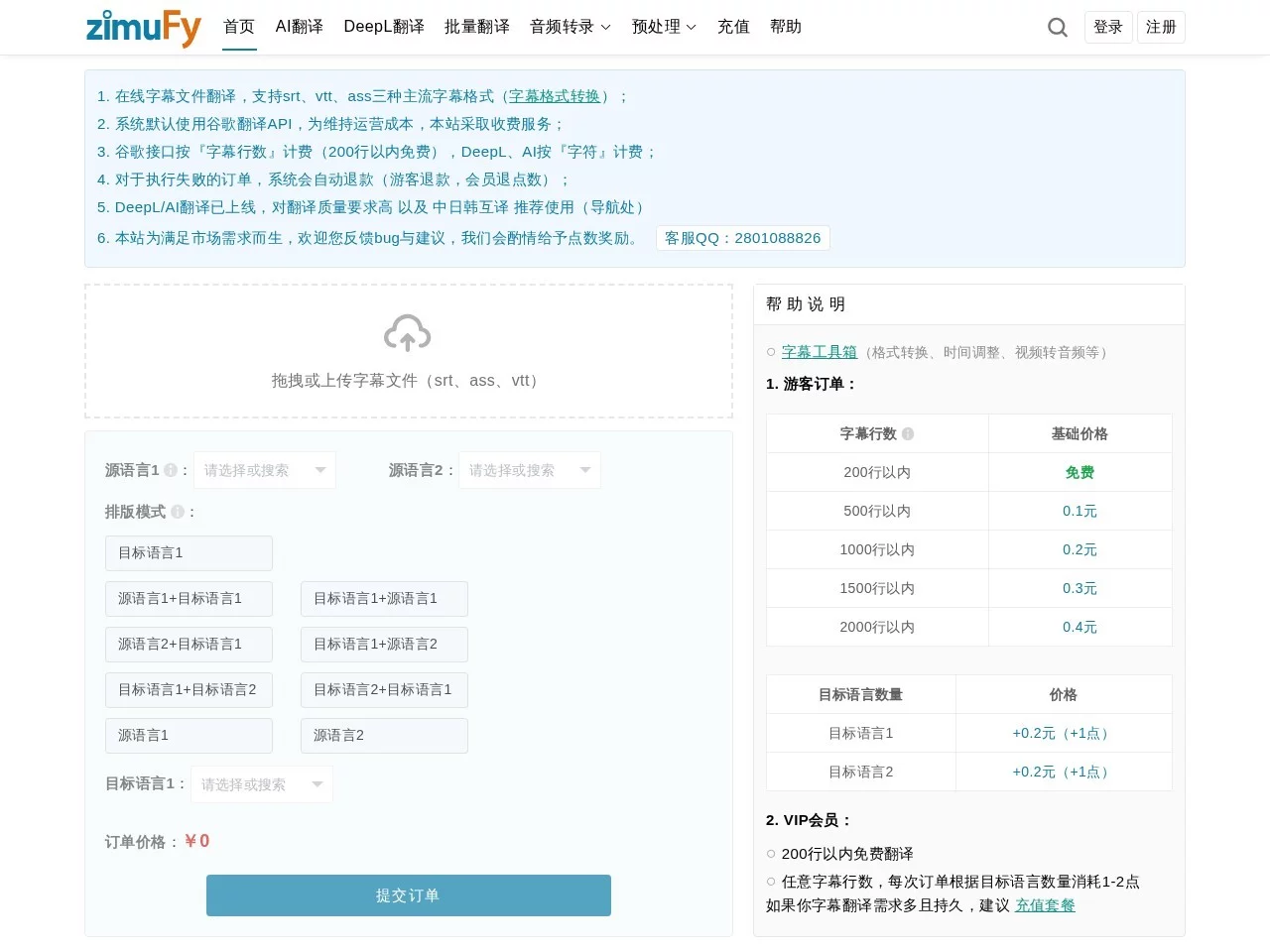
zimuFy is committed to providing online subtitle translation services, supporting SRT/VTT/ASS formats, Google Translate, AI Translation, and DeepL Translation, batch tran...


Screenshots

zimuFy

Why do subtitles always hold you back at the final stage of video production?

Most people who have made videos know this frustration: after editing the final cut, getting the voiceover and soundtrack right, you get stuck on subtitles—either translating dozens of SRT files line by line, or starting from scratch with a textless audio file to timecode. zimuFy is an online platform built specifically for these frequent needs, moving both subtitle translation and audio-to-subtitle workflows into the browser, eliminating the hassle of installing software locally and adjusting parameters.

Unlike many tools that only perform a single function, zimuFy covers two scenarios: translating existing subtitles and generating subtitles from scratch. It provides supporting capabilities such as translation mode selection, formatting optimization, and terminology management around these two core lines. For users who often need to deliver multilingual content, it’s like compressing the entire post-subtitle workflow into one page.

Official website: https://www.zimufy.com/

Two Core Workflows: Translate Existing Subtitles or Generate Directly from Audio

Subtitle Translation: Three Engines, Process Up to 100 Files at Once

For subtitle translation, zimuFy supports mainstream formats like SRT, VTT, and ASS, and can handle both monolingual and bilingual subtitle files. Users can choose from three translation modes as needed:

  • Google Translate: Fast, suitable for quick drafts where quality is not a high priority;
  • DeepL Translate: Consistent fluency for regular sentences;
  • AI Translation: Integrates the latest large language models like claude-3-5 and gpt-4o, with translation quality close to human level, especially advantageous in scenarios with dense sentence breaks and colloquial language.

Batch processing is also a major highlight of the subtitle translation section—you can process up to 100 subtitle files at once, so you don’t have to upload each one individually for large tasks like drama collections or course series. After translation, the platform also offers 5 monolingual subtitle formatting modes and 9 bilingual subtitle formatting modes, so the output file format can directly match the display habits of different players and publishing platforms.

Audio-to-Subtitle: Multiple Models Available, Covers 109 Languages

If you only have audio and video files and no subtitle files, you can directly use the audio-to-subtitle workflow. zimuFy has built-in multiple recognition models like Whisper, Nova2, Whisper Zero, and Tencent, which can perform intelligent sentence segmentation on speech, with transcription results comparable to human typing, saving a lot of proofreading time. In terms of language support, recognition and translation together cover 109 languages worldwide, so even small-language materials are supported.

Easily Overlooked Smart Details: Terminology, Encoding, and Timeline All Handled

Whether a subtitle tool is good often depends on the details. zimuFy has automated several error-prone steps:

  • Automatic language and encoding recognition: Automatically determines the source language after upload and recognizes file encodings like UTF8, preventing garbled text when opening files;
  • Style preservation and multi-line merging: Original subtitle styles won’t be disrupted during translation, and multi-line subtitles can be merged;
  • Terminology matching: You can set prompts for specific terms like proper nouns and character names, ensuring consistency throughout the translation, so names and places won’t be inconsistent;
  • Context-aware translation: AI translation processes intelligently based on context, reducing issues like sentence confusion and timeline inconsistency.

Pricing & Efficiency: Free for Up to 200 Lines, Results Return in 5 Seconds

The pricing mechanism is straightforward: charged per line, free for up to 200 lines, with extra lines charged per byte. For users who occasionally process one or two episodes of subtitles, the free quota is usually enough; heavy users pay as they go, with costs growing linearly with usage, unlike subscription models that have unused waste. In terms of efficiency, translation tasks usually return results within 5 seconds, and combined with batch processing, waiting time is almost negligible.

The interface is simple, with clear function entries and no complex parameter panels. New users can complete a full translation or transcription operation by following the process once.

Usage Tips & FAQs

Based on the platform’s capabilities, the following scenarios best leverage zimuFy’s value:

  • Self-media and editing teams: Need to produce multilingual subtitles in batches for videos, using batch translation plus formatting modes to get it done in one step;
  • Course and podcast creators: Have a lot of recorded materials, using audio-to-subtitle to quickly generate transcripts and subtitle files;
  • Subtitle teams and dubbing translators: Use terminology matching and AI context translation to reduce proofreading costs and ensure consistency of proper nouns.

Frequently asked questions:

  1. Can Chinese subtitles be converted to bilingual versions? Yes. The platform supports both monolingual and bilingual subtitle files, with 9 bilingual formatting modes available.
  2. How accurate is audio-to-subtitle? With the design of multi-model intelligent sentence segmentation, the results are comparable to human work. It is recommended to choose the appropriate recognition model based on language and audio quality.
  3. Is there a threshold for trial? Under the per-line billing model, it’s free for up to 200 lines, so small files can be experienced directly.

If you’re spending a lot of time on batch subtitle translation or audio transcription, try running a file with the free quota first, then decide whether to include it in your daily workflow.

Relevant Navigation

No comments

You must be logged in to leave a comment!
Login immediately
none
No comments...