
Muscle WikiProfessional fitness website - simplified training - home workouts
Screenshots

Click and Train: One Interactive Muscle Map Makes MuscleWiki Your Portable Personal Trainer
Official website: https://musclewiki.cn/
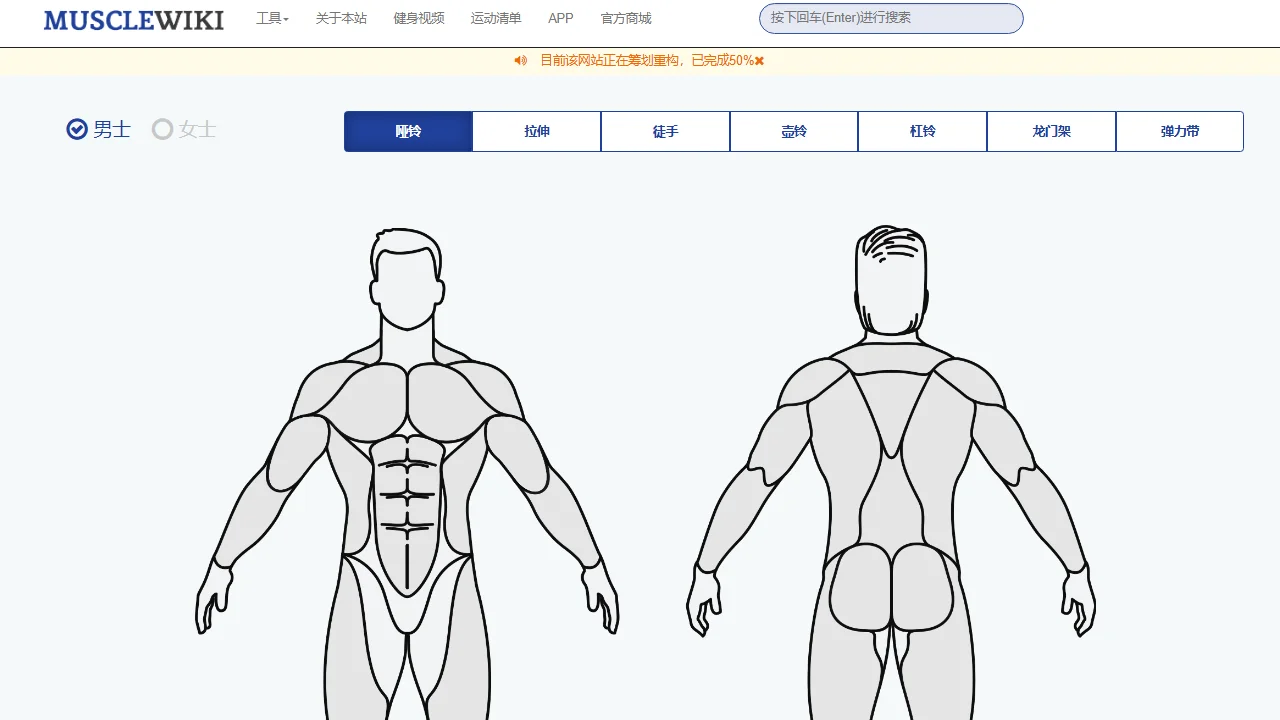
Many people face the same dilemma when they start working out: they want to train a certain muscle group but have no idea which exercises to do, how much weight to use, or how many reps to perform. Instead of piecing together tutorials from across the web, just open MuscleWiki — a completely free fitness app and tool platform that breaks down the complex human musculature into an interactive map. Simply click on the muscle you want to train, and you’ll instantly see the corresponding exercises, step-by-step guidance, and training plans. Whether at home or in the gym, it helps you plan your training with total clarity.
What Can It Actually Do for You
Over 2,000 exercises covering every muscle in the body
MuscleWiki’s exercise library is remarkably solid, featuring over 2,000 exercises, each with video demonstrations and written explanations. Want to train your chest, back, or legs, or target detail areas like arms and shoulders? Just click the corresponding muscle on the body model and a detailed illustrated guide appears instantly. Even more thoughtfully, users can choose tutorials by gender, so the exercise instructions better match the training needs of different bodies. Equipment is covered too: dumbbells, barbells, bodyweight training and other equipment types are all categorised, so even if you only own a pair of dumbbells at home, you can find plenty of alternative exercises.
A suite of smart tools — no more training by feel
Beyond finding exercises, the platform also integrates a full set of practical tools that solve the tricky question of “how much to train” as well:
- Calorie calculator: paired with sensible training, it quantifies your daily calorie expenditure and intake;
- One-rep max calculator: helps beginners quickly determine the right lifting weight and rep count, avoiding blindly going too heavy;
- AI fitness assistant: provides personalised training plans and science-based nutrition advice, plus smart exercise recognition — like a personal trainer on call at all times.
These tools work together to form a complete loop from goal setting and exercise selection to intensity control. What used to require repeated explanations from a coach can now be answered clearly with just a few clicks, greatly reducing the decision-making cost of fitness.
Three Types of Users, Each with Their Own Best Approach
Fitness enthusiasts at different stages use MuscleWiki with different priorities. Here are a few targeted approaches:
Complete beginners
Start with bodyweight exercises and machines: first learn the location and function of each muscle group via the body map, then use the one-rep max calculator to determine a safe starting point. The platform also has an FAQ section that systematically explains the science of fitness. Once you’ve filled in the basic concepts, systematic training will progress much more smoothly.
Home workout enthusiasts
Limited equipment at home isn’t a problem. Filter exercises by equipment type and combine them with the training plans provided by the platform, and you can streamline your home workout routine into just a few steps. With video demonstrations and step-by-step guidance, you can perform each movement with proper form even without supervision.
Experienced enthusiasts
Advanced users can use the AI assistant to create periodised training plans, adjust their diet based on the nutrition advice, and use the calorie calculator to fine-tune their calorie deficit or surplus, making progress towards muscle gain or fat loss far more methodical.
A Few Common Questions
Is MuscleWiki free?
Yes, it is a free fitness app and tool platform. The core exercise library and calculation tools can be used directly with no paywall.
Is it convenient for Chinese users?
The platform offers a Chinese official website version, compatible with the web, iPhone, and Android clients, and is linked to Chinese fitness communities such as Zhihu, so Chinese users can browse content and join discussions at any time. In addition, the platform provides back-end management features (including a test account for trial), making the overall experience quite friendly for Chinese users.
Can someone with zero background understand the exercise guides?
Yes. Every exercise comes with step-by-step guidance in both video and text form. Just click a muscle on the body model to get the corresponding illustrated explanation — the learning curve is very low, which is exactly why it is called “beginner-friendly”.
Why It Deserves a Spot in Your Favourites
Fitness content on the market is a mixed bag, but MuscleWiki’s approach is refreshingly simple: putting science at its core to help users understand their bodies and simplify training. It doesn’t rely on gimmicks; instead, it turns “finding exercises, setting weights, planning workouts, and managing diet” into a handy set of tools. Free, multi-platform, and comprehensive, with the added boost of an AI assistant — whether you’ve just bought a gym membership and don’t know where to start, or you’re working out at home and want a more systematic plan, just open MuscleWiki’s official website, click around the body map, and see what your first personalised training programme looks like.