AD Recommendation
Join Now
Important: Please do not trust the content and ads of various websites easily! Recommended reading: Safety Tips
Ikonate
Scan to visit on your phone
3wks agoupdate 620 00
0

IkonateIkonate

A fully open-source and free vector icon library


Screenshots

Ikonate

What is Ikonate? An open-source, free vector icon set

In UI design and front-end development, the choice of icon resources often directly determines a product’s visual quality. Ikonate is a fully open-source and free vector icon library. All icons are provided in SVG format, with clean lines and a consistent style, and are commonly used in UI/UX design, website building, and interface construction for all kinds of applications. For teams on a limited budget who want to avoid copyright pitfalls, its open-source nature offers a nearly zero-barrier starting point.

Official Website: https://ikonate.com/

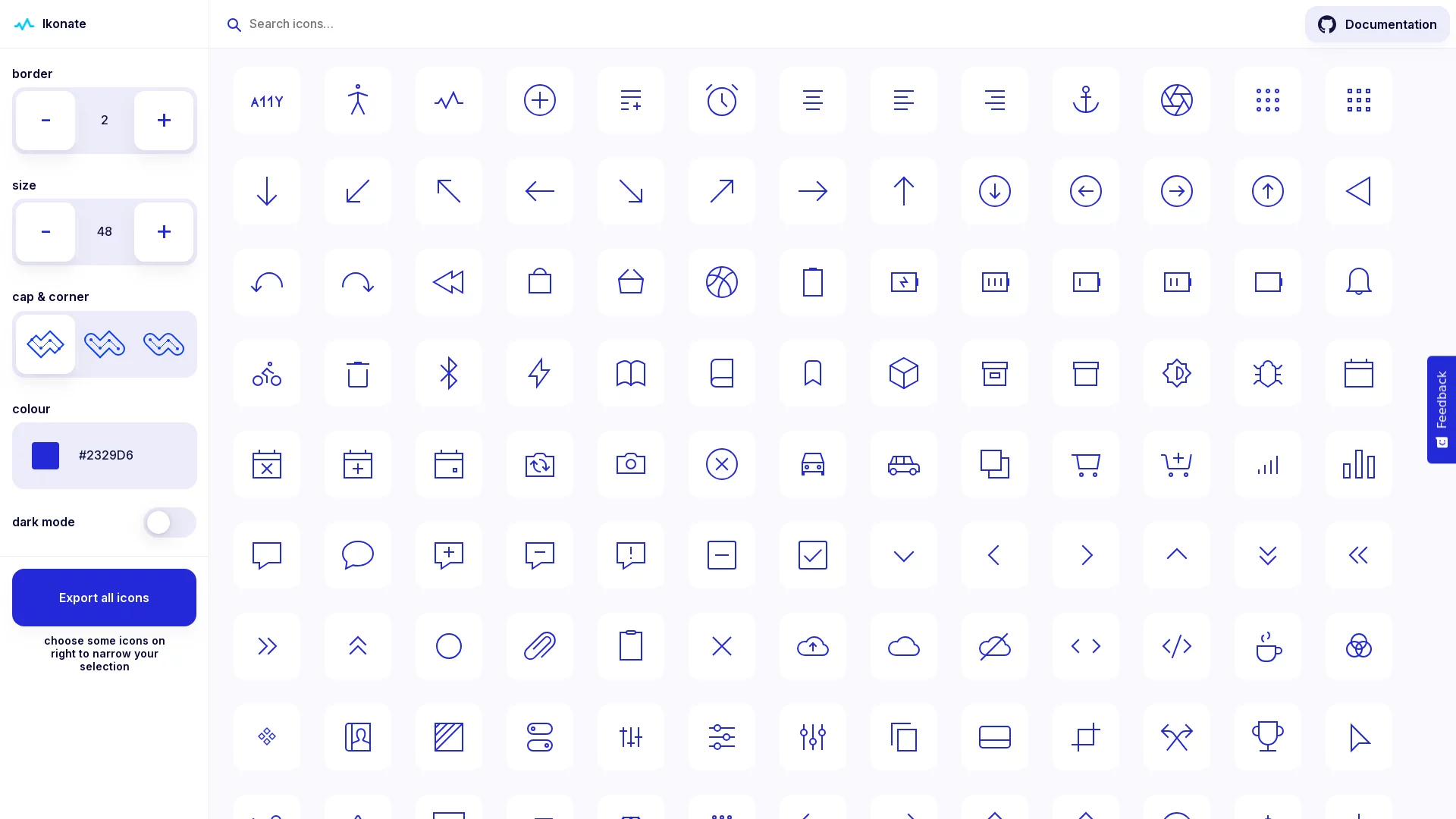
Unlike many “download and use” static icon packs, Ikonate’s core strength lies in being highly customisable: the weight, size, colour, and even rounded or sharp corner style of the icons can all be adjusted online to match project requirements before use, making it exceptionally flexible among free icon libraries of its kind.

How powerful is the customisation? A breakdown from stroke weight to corners

The problem with many icon libraries is that you take whatever they give you; once a project’s design guidelines conflict with the icons’ default styles, designers have to rework each one manually. Ikonate moves this work upfront into an online tool. The commonly adjustable options include:

  • Stroke weight: a thin-line style suits lightweight, minimalist interfaces, while bolder icons stand out better on dark backgrounds or at small sizes;
  • Size: the SVG vector format supports lossless scaling — icons stay sharp no matter how large they are enlarged, easily fitting high-resolution screens;
  • Colour scheme: freely change icon colours to quickly align with brand or theme colours;
  • Rounded and sharp corners: switch styles with one click to match either a rounded or a bold design language.

None of these adjustments require opening design software to process one by one — everything can be done on the official website. Once satisfied, simply export and take the icons away, a clear boost in efficiency.

Integration with mainstream design tools

Ikonate’s icons are compatible with mainstream design tools such as Sketch, Figma, and Adobe Photoshop, so designers can drag the adjusted SVG files straight onto the canvas for further refinement. Since all icons come from the same system, the style is consistent and easy to recognise, and complete interfaces won’t suffer from icons that feel out of place.

How to integrate it into a project? Two paths to choose from

For developers, Ikonate offers more than one way to get started, so teams of different sizes and tech stacks can all find a convenient approach:

  1. Install via npm package management: quickly integrate into a project through the package manager — suitable for front-end projects with a build pipeline, and convenient for later upgrades and maintenance;
  2. Manually clone the GitHub repository: get the full source code and icon resources directly — suitable for scenarios requiring deep secondary development or offline use.

When taking an individual icon, you can export it as SVG or HTML, making it easy to modify properties at the code level — such as dynamic colour changes or linking with the theme — leaving plenty of room for secondary development.

Accessibility and free commercial use: two easily overlooked pluses

Though small, icons carry key information such as navigation and prompts. Ikonate has been specially optimised for accessible browsing, adapted to different devices and usage scenarios to ensure the icons remain readable and usable for low-vision users and in high-contrast mode. This is particularly friendly to products with high inclusivity requirements, such as government, healthcare, and education.

Copyright is even more worry-free: Ikonate is completely free and allows commercial use. Both personal projects and commercial applications can use it with confidence, with no compliance risk from hidden licensing fees.

Quick FAQ

Are there many icons? What scenarios do they cover?

Ikonate’s total number of icons is not huge, but it wins on precision, covering the most common design needs such as navigation menus, interactive buttons, and alert boxes. For small and medium-sized projects, this core set is already sufficient; if you need more specialised industry icons, you can also use it alongside other icon libraries.

Will the icons lose quality? Which tools can they be used in?

No. All icons are provided in SVG vector format and stay sharp when scaled, can be edited directly in design tools such as Sketch, Figma, and Adobe Photoshop, and integrate smoothly into all kinds of development scenarios.

What should you note about commercial use?

No payment is needed — simply get the full resources and usage guide from the official website and start using them. If you are looking for a free, deeply customisable, accessibility-friendly vector icon library, Ikonate is well worth trying first — from adjusting styles online to exporting and integrating, the whole workflow can be completed within a single site.

Relevant Navigation

No comments

You must be logged in to leave a comment!
Login immediately
none
No comments...