Smart TranslatorSmart Translator online translator helps users quickly and accurately perform text translation operations such as English, Japanese, Korean, Cantonese translation, and al...
Screenshots

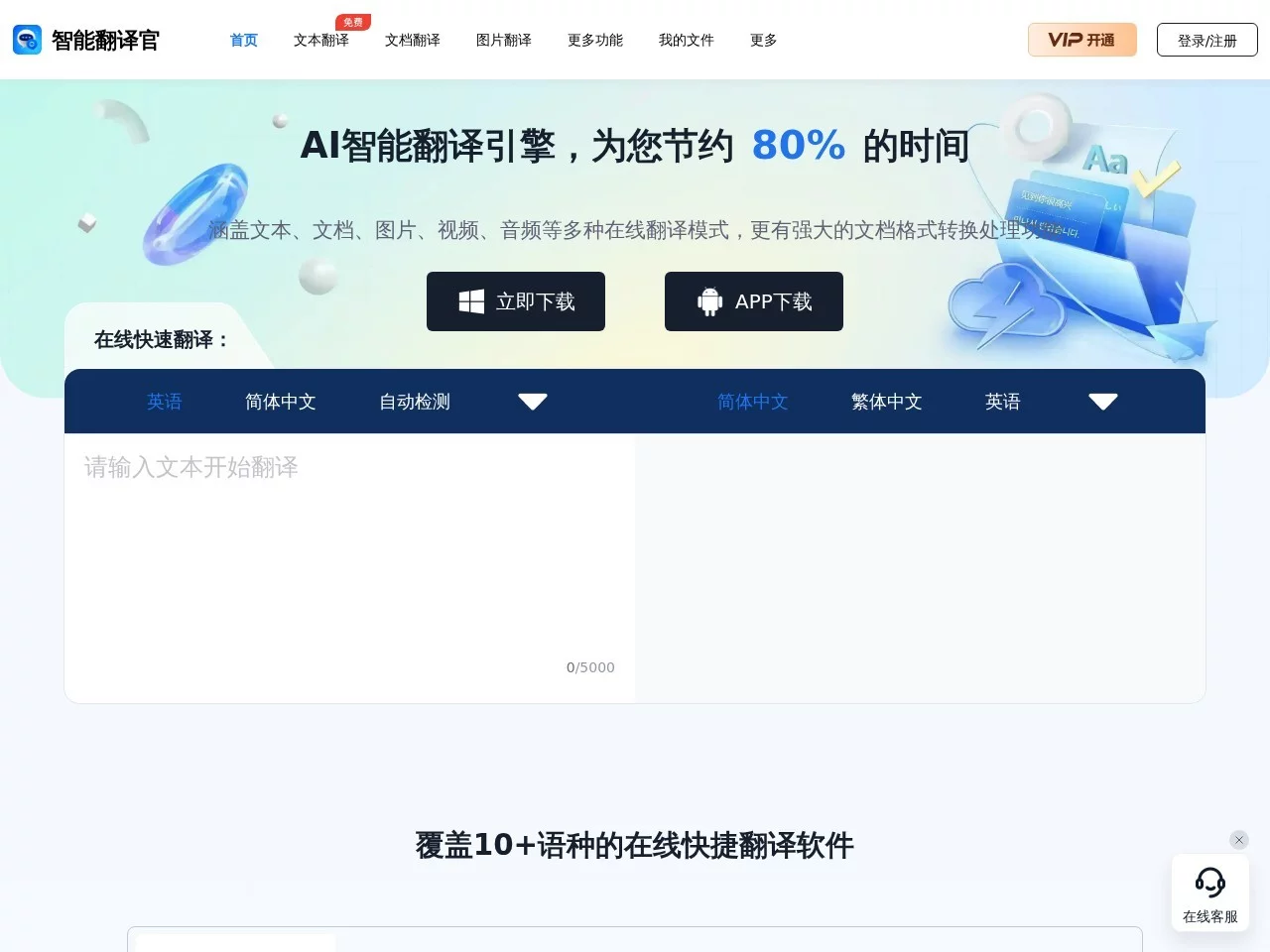
When you get a fully English contract, a foreign document you haven’t understood yet, or a foreign language video with unclear lines, many people’s first reaction is to open a search engine to find a translation tool. Smart Translator is a comprehensive translation software designed for such needs. It integrates multiple translation capabilities such as text, documents, images, videos, and audio into one platform, supporting mutual translation between more than 10 languages including English, Simplified Chinese, and Traditional Chinese. It also comes with document format conversion functions, making “translation” — originally a trivial task — simple and straightforward.
Starting from Pain Points: Why This Tool Is Worth Trying
Official website: https://www.fanyi1234.com/
Traditional translation processes often go through several steps: first copy the content from the PDF, paste it into a translation tool, then transcribe the result back to the original document, and if the typesetting is messed up, you have to adjust it manually. For scanned images or foreign language videos, it’s even impossible to start. Smart Translator has integrated these steps. According to official data, with the help of the AI intelligent translation engine, users can save about 80% of translation time and quickly get accurate translation results.
The way to get it is also simple: directly visit the official website to use the web version, or click the download button on the official website homepage to get the client. The web version is suitable for temporary light translation, while the client is more suitable for users who need to frequently process large files. You can choose either way as needed.
One-stop Multi-format Processing, Covering All Aspects of Daily Translation
A major highlight of this tool is its format compatibility. Whether it’s translation needs encountered in study, work or life, they can mostly be solved in the same software:
- Document Translation: Supports online translation of common office formats such as PDF, Word, PPT, Excel; just upload the entire file directly.
- Image Translation: When encountering screenshots, scanned copies, photos of menus or signs, it can directly recognize and translate the text in the image.
- Audio & Video Translation: Foreign language videos and audio recording materials also support online translation processing, eliminating the need to transcribe sentence by sentence.
- Text Translation: For daily scattered short sentences and paragraph translations, it’s available whenever needed.
- Format Conversion: Comes with document format conversion functions, which can also solve format problems before or after translation.
For people who often deal with various files, this means there’s no need to switch back and forth between multiple tools; one entry can cover most translation scenarios.
High Fidelity, Professionalism, Security: Three Key Details of Document Translation
High-fidelity Layout Restoration
The biggest fear in document translation is not inaccurate translation, but the complete mess of layout after translation. When processing documents, Smart Translator can maintain the original layout style, keeping paragraphs and chart positions as much as possible, making it convenient for users to check the translation results paragraph by paragraph, saving the trouble of re-typesetting afterwards.
Unified Terminology
Professional documents are full of a large number of disciplinary terms; ordinary machine translation is often inconsistent, making it confusing. The lexicon of Smart Translator covers over 850 disciplines and 2.3 billion terms, ensuring that the same term remains consistent throughout the translation, which is especially important for serious texts such as papers, reports, and technical materials.
Bank-level Encryption Guarantee
Business contracts and scientific research data often involve privacy and confidentiality; security is an unavoidable issue when uploading for translation. Smart Translator uses bank-level encryption technology to ensure document security, allowing users to handle sensitive content with confidence. In addition, the software also provides file management functions, saving document translation records, so you can find previously translated documents with one click when you need to review them.
Who Is Most Suitable for Using It?
Combined with the product’s capabilities and characteristics, the following types of users will have particularly obvious experience:
- Students and Scientific Researchers: Quickly understand foreign documents and easily complete paper writing; this is a common scenario for paper document translation.
- Business and Foreign Trade Practitioners: Multilingual business documents are frequently exchanged; translating multilingual documents with it can help complete international business more smoothly.
- Foreign Language Learners: When encountering materials they don’t understand during foreign language course learning, it can directly assist understanding, allowing learning while using.
- Professional Personnel: Such as simultaneous interpreters, medical graduate students, international exchange students, etc.; using the professional terminology database to solve the translation problems of rare words, significantly improving work efficiency and translation quality.
From user feedback, this tool has received widespread strong recommendations. Especially users in the above professional fields highly praise its performance in terms of efficiency improvement and terminology accuracy.
A Few Common Questions, Understand Before Using
How to choose between the web version and the client? If you only occasionally translate a few sentences or a small file, just use the official website’s web version; if you often process entire documents, audio and video, or other large files, it is recommended to download the client, which is more convenient for operation and management.
Will the document layout change after translation? The software will maintain the original document layout style when translating documents. Users can check by comparing the original text with the translation; high fidelity is an important feature that distinguishes it from ordinary translation tools.
Can files in professional fields be translated accurately? Relying on the lexicon covering over 850 disciplines and 2.3 billion terms, professional terms in the translation can remain consistent throughout. It provides good support for document translation in fields such as medicine, law, and academia.
If you are troubled by foreign materials, multilingual files, or audio and video translation, you might as well add it to your toolbox through the official website, letting AI help you overcome the language barrier.
Relevant Navigation


Super Intelligent AI Knowledge Base

法唠AI
酷表Chat Excel
LivePPT