QR Code Generator
QR Code Generator, a free online QR code generator that can create colorful QR codes with various functions, including website URL QR codes, business card QR codes, product QR codes, WYSIWYG, easy and simple to use.
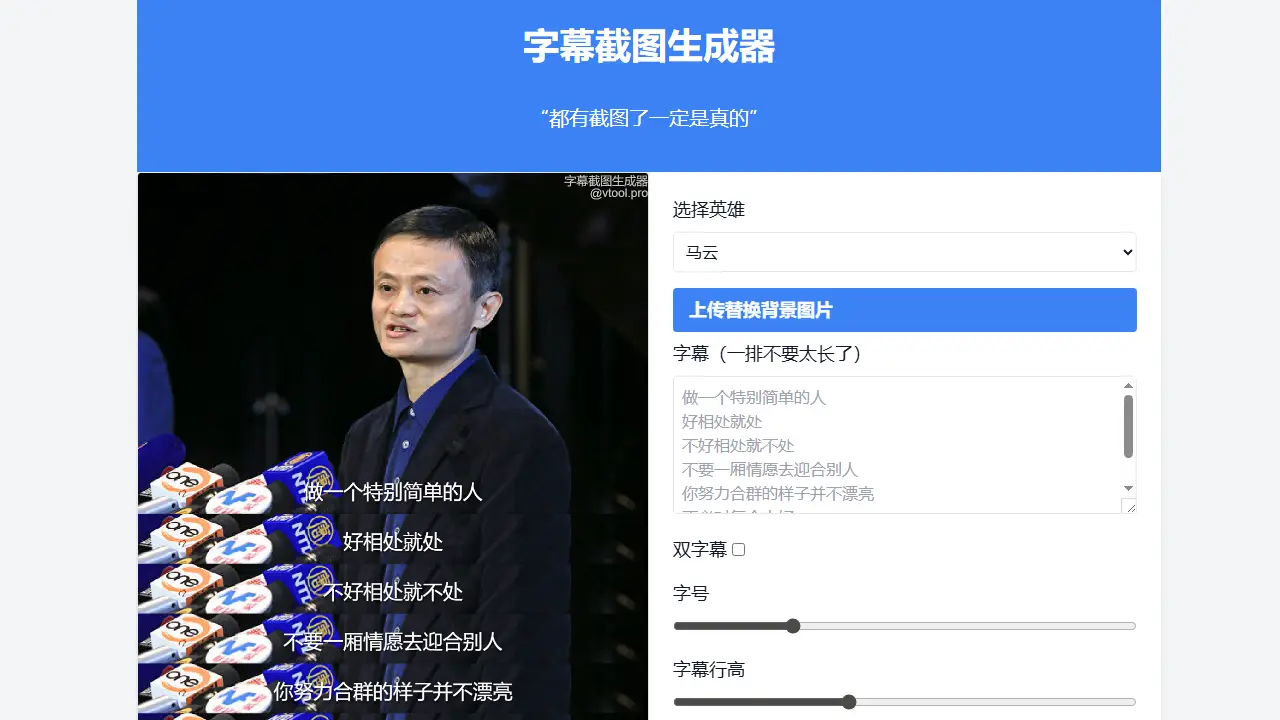
 Subtitle Screenshot Generator
For creating images with custom subtitles
When browsing social media, you must have seen images with lines at the bottom — maybe a touching movie dialogue, or a well-crafted chat message. Such images are often easier to remember and share than plain text, and the threshold to make them is actually much lower than you think. Subtitle Screenshot Generator is an online tool built exactly for this purpose. Users only need to upload an image and enter the lines, then quickly produce a finished image with custom subtitles; the whole process can be completed in the browser.
Official website: https://vtool.pro/subtitle/index.html
In the era of information flow, users usually only spend one or two seconds on a single image. Subtitle images solve this problem perfectly: the visuals attract attention, while the subtitles convey emotions and viewpoints, combining to express content in an instant. A well-matched line with a suitable image has a far higher chance of being screenshotted and shared than a plain long text.
For this reason, subtitle screenshots have become a common material form in fields such as social media, video content production, and self-media operation. In the past, making such an image might require opening professional design software to typeset slowly; now, with the subtitle screenshot generator, it can be done in minutes, and the efficiency improvement is very obvious.
Don’t be fooled by the simple finished image — the tool actually covers several key steps required for image creation. Breaking down the features one by one, you’ll find it’s almost a mini image editor focused on subtitle scenarios:
In addition, some similar tools also support selecting built-in background images, or uploading fully custom images, making the subtitle effect more fit for personal style. For users who pursue personalization, this means the finished product won’t be bound by fixed templates, and each image can have its own unique feel.
The operation logic of the subtitle screenshot generator is very straightforward, even first-time users can get started quickly. The whole process can be summarized in three steps:
If you want your subtitle screenshot to look less like a quick job, pay attention to details when adjusting parameters. The font size should not be too large, otherwise it will easily block the main subject of the image and overshadow it; the line height should also match the font size, keeping even breathing space for multi-line lines, which will look more like real movie subtitles.
In addition, the matching degree between the line content and the image emotion is also important. A funny image paired with a serious line often creates a contrast effect; a lyrical image paired with concise dialogue is more likely to resonate. The tool handles the form correctly, but the clever content ideas still depend on the creator themselves.
The application scope of subtitle screenshots is wider than many people think. The following scenarios are where this tool is used most frequently:
The most benefited are self-media operators. The content industry values timeliness and output, and the shorter the cycle from concept to finished screenshot, the faster the topic can be implemented. The subtitle screenshot generator has precisely lowered the threshold of image creation to almost zero, allowing creators to focus on the content itself.
No. It is an online tool — just open the browser and visit the tool page to use it directly, saving the trouble of downloading and installation, and not taking up local storage space.
Yes. Parameters such as font size and line height support custom adjustment, and users can repeatedly fine-tune according to their own aesthetics until they are satisfied before saving the finished product.
Yes. Users can upload their own images as the base image; some tools also provide options to select background images, both ways can achieve personalized subtitle effects.
When an image and a line can carry a complete expression, the focus of creation shifts from whether you can use the software to whether the content itself is good enough. Pick a suitable image, write a line you want to say, and leave the rest to the tool.